Microsoft Intune · Chrome Enterprise · ADMX · PowerShell · Policy Management
ADMxSqueezer: turning full Chrome templates into clean Intune deltas
Why ADMxSqueezer compares Chrome policy templates, how it keeps only newly introduced policies and their dependencies, and why its versioned output is a community workaround that must be tested before production use.
- Drafted
- Published
- Reading time
- 5 min
- Author
- Roberto Gramellini
Source:
ADMxSqueezer
· revision fc499fac
- ADMxSqueezer
- Chrome ADMX delta
- Intune ADMX import
- Chrome policy templates
- ADMX dependency resolution
- ADMX version comparison
- rapid software policy releases
- AI product governance controls
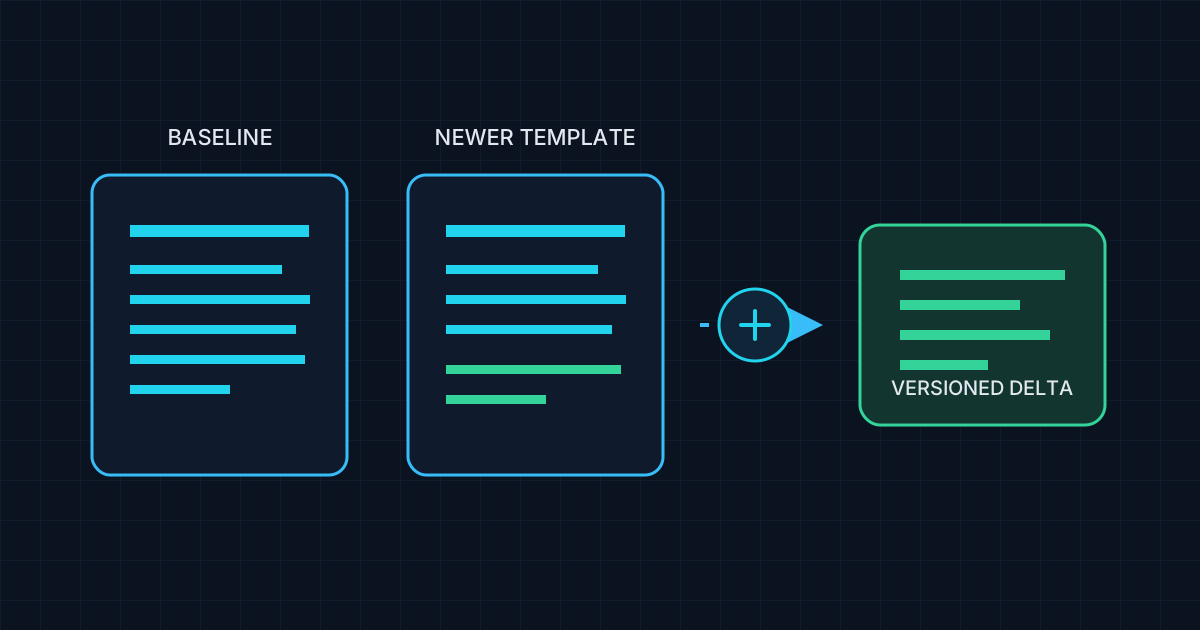
ADMxSqueezer: turning full Chrome templates into clean Intune deltas
Chrome's Windows policy templates are cumulative: a newer release includes policies that existed before as well as the latest additions. That is convenient for a clean Group Policy deployment, but it creates friction when an Intune tenant needs to keep multiple imported ADMX versions around. Importing another full template can collide with existing namespaces or leave administrators looking at duplicate policy entries.
ADMxSqueezer was built to make that version-to-version change smaller and easier to reason about. It compares two Chrome chrome.admx files and emits a delta containing policy definitions that are new in the later template, rather than asking Intune to ingest the entire cumulative catalog again.
The feature gap: template versioning is not incremental
The repository documents three related problems: Intune can reject a second template with the same namespace, renaming the template can make duplicate settings appear, and the upstream Chrome files do not provide an Intune-oriented “only what changed” package. For administrators rolling out newer Chrome capabilities gradually, the practical choices can become removing an older import, reconciling references, and re-importing a full catalog—or accepting a cluttered Settings Catalog.
ADMxSqueezer takes the incremental route. For example, instead of presenting all policies from Chrome 146 again, a comparison against Chrome 143 can produce a version-labeled package containing only the intervening additions. The output is intended to make parallel version imports more manageable, not to replace the original Google templates or to change what Chrome itself supports.
Beyond Chrome: keeping pace with fast-moving products
Chrome is the first concrete use case, not the limit of the delta idea. The same approach can help with any product whose vendor publishes compatible ADMX/ADML templates and adds administrative policies at a rapid release pace. That matters even more as products gain AI capabilities: new features can arrive quickly, and the corresponding controls for governing or restricting them may follow in successive template releases. Where those controls are exposed through ADMX, comparing versions can make newly added settings easier to identify and adopt without repeatedly importing a full cumulative catalog.
There is an important implementation boundary: this repository's current generator is tailored to Chrome conventions, including Chrome-specific filenames and Google policy namespaces. Applying the approach to another vendor requires adapting and validating those conventions and its resource dependencies first; the current script is not a universal, drop-in ADMX converter.
How the generator builds a usable delta
The script loads both inputs as XML and builds case-insensitive sets of policy names. It selects policy definitions found in the newer file but absent from the baseline. That comparison is only the first step: a policy can refer to categories, localized strings, presentation resources, or supported-on definitions. The generator walks category ancestry and gathers the referenced resources before writing output.
It then assigns the generated definition a versioned target namespace and filename, filters ADML language resources to the languages present in both inputs, and checks that generated XML is well formed. The result is a smaller matched ADMX/ADML package, rather than a policy fragment stripped of the labels and presentation metadata that make it usable.
Code excerpt: select additions by policy identity
This abbreviated excerpt from Compare-ADMXPolicies.ps1 shows the set comparison. The full script also resolves dependencies and writes the ADMX/ADML output.
$baselinePolicyNames = Get-PolicyNames -AdmxXml $baselineXml
$deltaPolicies = @()
foreach ($policy in $newerXml.policyDefinitions.policies.policy) {
    if (-not $baselinePolicyNames.Contains($policy.name)) {
        $deltaPolicies += $policy
    }
}
The generated target namespace incorporates the newer Chrome version, so separate deltas can be identified as distinct template definitions. A unique namespace is a useful collision-avoidance mechanism; it is not, by itself, a guarantee that every Intune tenant will accept every generated package.
Shape of the workflow
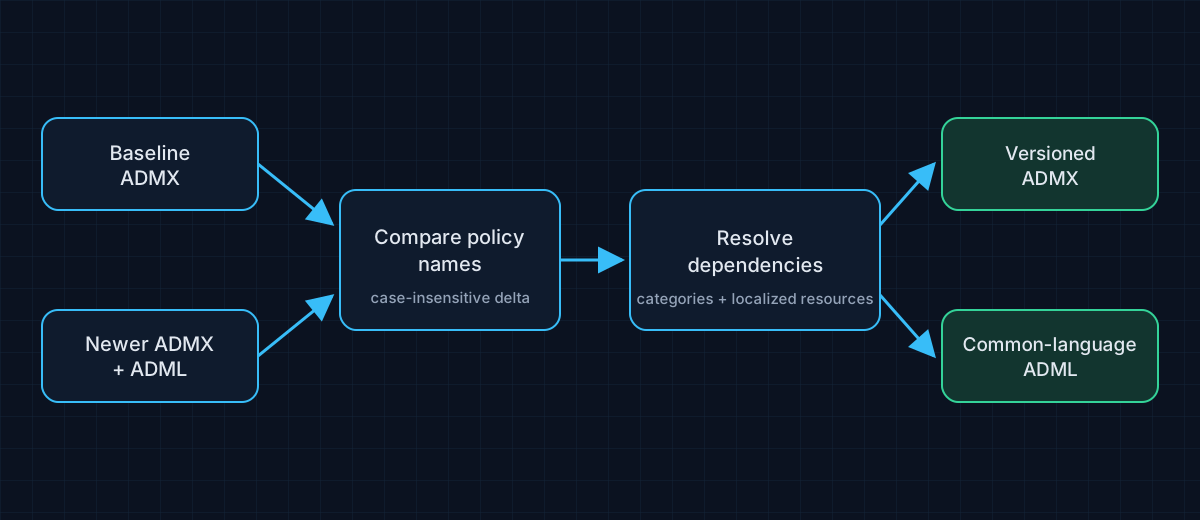
The inputs are the administrator-supplied baseline and newer Chrome templates. The output is a versioned folder containing the delta ADMX and corresponding ADML files for common languages, ready for an administrator to test and import into Intune.
Important limits before uploading
The repository explicitly labels this as an unsupported community workaround: neither Google nor Microsoft endorses or supports the modified templates. The comparison focuses on policies newly added between two versions; it is not a semantic migration engine for changed or removed settings. Administrators still need to review template changes, test imports in a non-production tenant, and verify policy behavior on representative devices. Keep the original vendor templates so the delta can be reproduced and audited.
The project is MIT-licensed. Its script, example templates, and usage notes are available at the ADMxSqueezer repository; the pinned script revision used for this walkthrough is fc499fac. The tool can reduce duplicate paperwork; it cannot make an unsupported import supported. That part still requires testing.