Delivery Optimization · Intune · Azure Functions · Log Analytics · mTLS · Service Bus · Bicep
DO-Monitor: finding out where your Delivery Optimization bytes really come from
How an Intune Proactive Remediation, a certificate-gated Function App, Service Bus and Log Analytics turn per-job Delivery Optimization data into workbooks and alerts.
- Drafted
- Published
- Reading time
- 10 min
- Author
- Roberto Gramellini
Source:
DO-Monitor
· revision 31ac891c
- Delivery Optimization monitoring
- peer caching telemetry
- Intune Proactive Remediation
- Logs Ingestion API
- client certificate validation
- DOStatus_CL
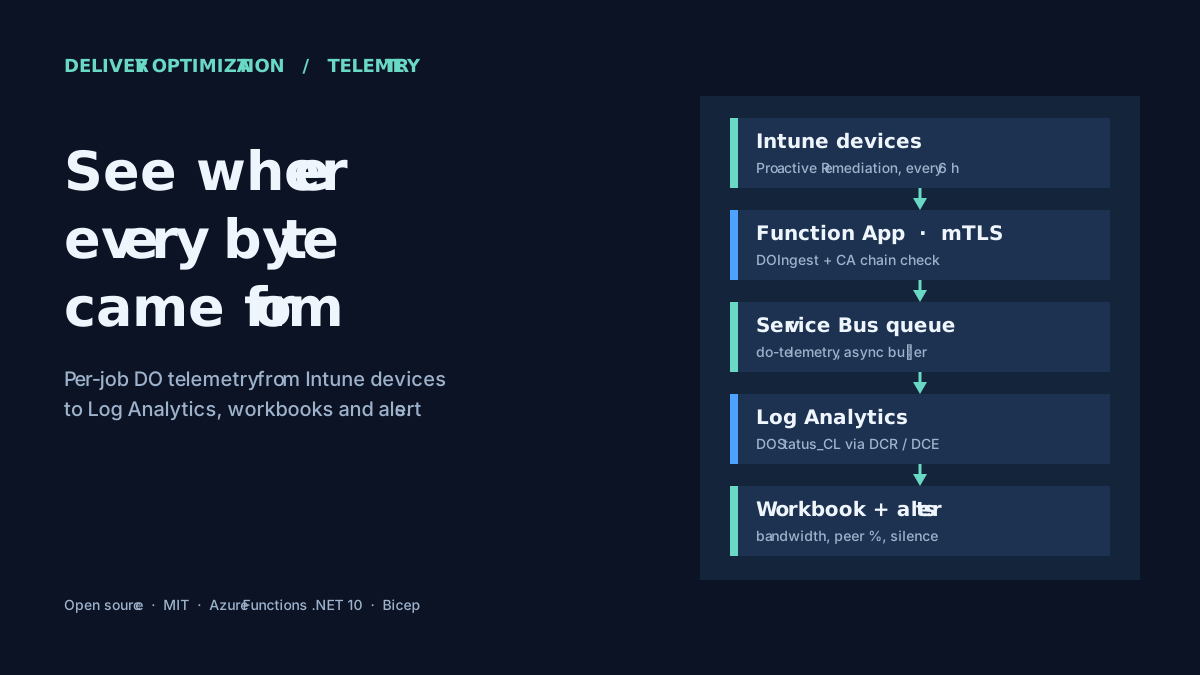
DO-Monitor: finding out where your Delivery Optimization bytes really come from
DO-Monitor is an MIT-licensed project. This article describes the public source at revision 31ac891, which reports version 2.7.4.
The month the WAN link turned red
Picture a branch office on a modest WAN link. Patch Tuesday lands, a large feature update follows, and the link graph turns the colour of an unhappy sunset. Somebody asks the reasonable question: "Isn't Delivery Optimization supposed to prevent this?"
Delivery Optimization (DO) is the Windows peer-to-peer download engine. Devices that already have a piece of content can hand it to their neighbours, so fewer bytes cross the WAN or the Internet. It is enabled quietly, configured through policy, and it works or doesn't without leaving much evidence. Windows can tell you what one device did, through Get-DeliveryOptimizationStatus. What it cannot do is tell you, across thousands of devices:
- which downloads generated the traffic, and from which URL;
- how many bytes came from peers, from the HTTP source or from a Connected Cache server;
- which devices are the heaviest consumers;
- which devices are not using DO the way you configured them to.
DO-Monitor fills that gap. It collects per-job DO telemetry from Intune-managed Windows devices, carries it through a serverless Azure pipeline, and lands it as one row per DO job in a Log Analytics custom table. On top of that sit a workbook and three alert rules. It is aimed at endpoint administrators and network teams who need to prove, or disprove, that peer caching is paying for itself.
Why build it instead of using what exists
Intune and Windows Update reporting tell you whether content was installed. They are not designed to answer bandwidth questions at job level. Per-device PowerShell is fine for one troubleshooting session and unusable for a fleet. A generic log shipper could move the data, but you would still need authentication, a schema, a queue to absorb bursts, and the dashboards.
DO-Monitor's design choices are visible in what it deliberately does not need:
- No new agent. The collector is an Intune Proactive Remediation detection script. If you already run Proactive Remediations, the rollout mechanism exists.
- No shared secret on the client. Devices authenticate with a client certificate (mTLS), not a workspace key or a function key embedded in a script.
- No stored credentials in Azure. Function-to-service calls use managed identities.
- No manual infrastructure. The whole environment is described in modular Bicep and deployed with a numbered PowerShell pipeline.
The pipeline at a glance
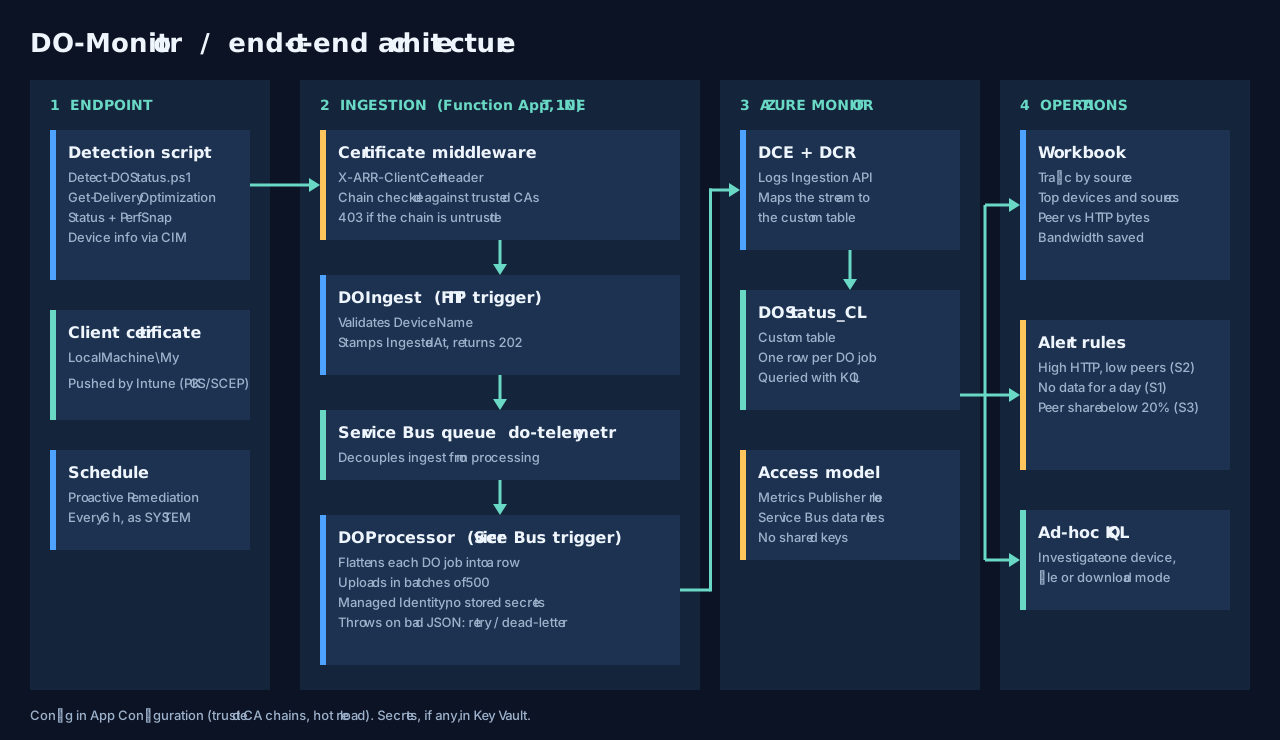
Read it left to right. A device runs the detection script, presents its certificate to a Function App, and the Function App hands the payload to a Service Bus queue. A second function drains the queue and writes to Log Analytics through a Data Collection Endpoint and Rule. Workbooks and alerts read from the resulting table.
Step 1: the client collects, and never changes anything
The detection script is scripts/Detect-DOStatus.ps1. It gathers device facts through CIM (OS version and build, serial number, domain, manufacturer, model), reads every DO job from Get-DeliveryOptimizationStatus, adds a performance snapshot and the effective DO policies, and posts the JSON to the ingestion endpoint using a certificate from LocalMachine\My.
For each job it captures the numbers that answer bandwidth questions: bytes from peers split into LAN, group, Internet and link-local; bytes from HTTP and from a cache server; bytes uploaded to peers; connection counts; the source URL; the caller application; and how long the download took. A missing certificate or a failed collection returns a non-compliant exit code, which is exactly what Proactive Remediations are meant to surface.
Two details matter operationally. In the supplied deployment instructions the Proactive Remediation is scheduled every six hours, so the dataset is a sampling of recent DO jobs rather than a continuous feed (the script itself has no scheduler). And the script must run as SYSTEM because the certificate lives in the machine store. Both are documented trade-offs, not surprises.
Step 2: the certificate gate
The ingestion endpoint is an HTTP-triggered Azure Function. Its authorization level is Anonymous, which sounds alarming until you notice where authentication actually happens: in the transport, before the function code runs.
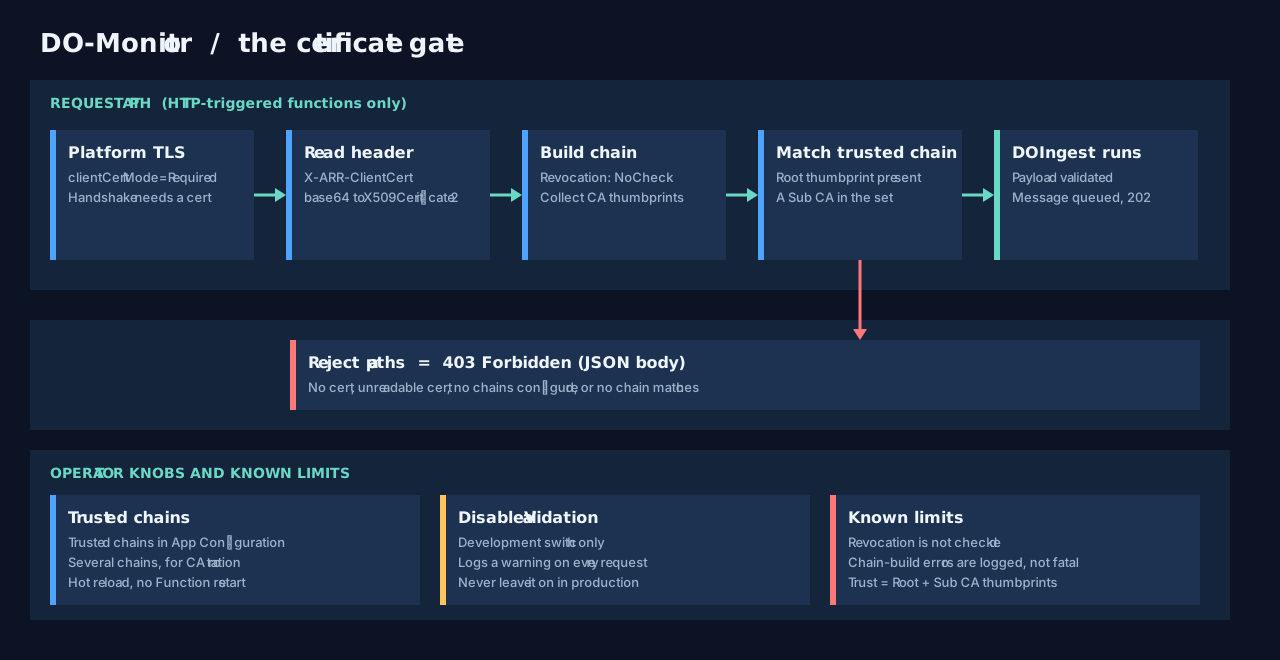
The Function App is configured to require client certificates. Azure forwards the presented certificate in an X-ARR-ClientCert header, and a Functions middleware then decides whether to trust it. The middleware only applies to HTTP triggers, so the Service Bus trigger is untouched (middleware source):
// Azure App Service forwards the client cert in the X-ARR-ClientCert header
if (httpRequestData.Headers.TryGetValues("X-ARR-ClientCert", out var certHeaders))
{
    var certBytes = Convert.FromBase64String(certHeader);
    clientCert = X509CertificateLoader.LoadCertificate(certBytes);
}
// Validate
if (!_certValidation.ValidateClientCertificate(clientCert)) { /* 403 */ }
(Excerpt condensed from the lines linked above; error handling omitted.)
The trust decision itself is not "does Windows trust this certificate". It is "was this certificate issued under a CA chain I explicitly configured". The validation service builds the chain, takes the thumbprints of everything above the leaf, and compares them with the configured chains: the root must be present, and at least one configured sub CA must appear (service source):
var hasRoot = chainThumbprints.Contains(rootThumbprint);
if (!hasRoot) return false;

var matchedSub = chainThumbprints.Any(t => subThumbprints.Contains(t));
if (!matchedSub && subThumbprints.Count > 0) return false;
return true;
Chains come from Azure App Configuration through IOptionsMonitor, so adding the chain for a new issuing CA is a configuration change with hot reload, not a redeployment. Several chains can be active at once, which is what makes CA rotation survivable. Two safety behaviours are worth noting: an empty chain list rejects everything rather than allowing everything, and the DisableValidation switch exists for development and logs a warning on every request it waves through.
Step 3: acknowledge fast, process later
After the gate, DOIngest does as little as possible. It deserializes the payload, rejects it if DeviceName is missing, stamps the ingestion time and returns 202 Accepted. The queue write is a multi-output binding on the same invocation (source):
public sealed class DOIngestResult
{
    [HttpResult]
    public IActionResult HttpResponse { get; set; } = new OkResult();

    [ServiceBusOutput("%ServiceBusQueueName%", Connection = "ServiceBusConnection")]
    public string? ServiceBusMessage { get; set; }
}
A bad request sets ServiceBusMessage to null, so malformed input never reaches the queue. The queue itself is the shock absorber. When tens of thousands of devices wake up on the same schedule, ingestion absorbs the spike and processing proceeds at its own pace. If processing fails, the Service Bus retry and dead-letter settings decide what happens next, instead of an unlucky device being told to try again.
Step 4: flatten, batch and write
DOProcessor is triggered by the queue. A payload holds device context plus a list of jobs; the processor turns each job into a row that repeats the device fields, so every row stands alone in KQL (source). A JSON failure is rethrown on purpose, so that Service Bus can retry it or dead-letter it rather than silently dropping data.
The upload service then sends the rows through the Logs Ingestion API in batches of 500, using DefaultAzureCredential, which in Azure means the Function App's managed identity (source):
foreach (var batch in entries.Chunk(BatchSize))
{
    await _client.UploadAsync(_dcrImmutableId, _streamName, batch.ToList(),
        cancellationToken: cancellationToken);
}
The Data Collection Rule maps the stream to the DOStatus_CL custom table. The deployment grants the Function identity Monitoring Metrics Publisher at resource-group scope, which is broader than the single rule; narrow it if your policies require it. No key is shared.
Step 5: turning rows into decisions
With one row per job, the questions from the beginning become short KQL queries. The project ships a workbook (traffic by source, daily trend, top devices, download modes, bandwidth saved) and three scheduled alert rules:
| Alert | Idea | Severity |
|---|---|---|
| High HTTP traffic | A device downloaded a lot over HTTP and almost nothing from peers | 2 |
| No data received | No DOStatus_CL job rows with a collection timestamp in the last day; a hint that collection or the pipeline may be broken |
1 |
| Low peer efficiency | Fleet-wide peer share fell below 20% | 3 |
The "no data" alert is the one I like best, with one caveat: it looks at the collection timestamp of job rows, so a device that reports zero jobs produces no row. Monitoring that can fail silently is a hobby; monitoring that notices its own silence is an operation. The alert definitions and their KQL are in alerts/DO-Alert-Rules.json.
Deploying it
Infrastructure is split into Bicep modules for App Configuration, the custom table, the data collection rule and endpoint, the Function App, Key Vault, Log Analytics, monitoring, Service Bus and storage. A numbered PowerShell pipeline, orchestrated by Deploy-All.ps1, deploys the infrastructure, seeds App Configuration, builds and publishes the functions, deploys the workbook and alerts, generates the client script and validates the result. There are helpers for client PKI, for importing certificates and for publishing the package to Intune.
If you are not ready to run any of the cloud pieces, the project also offers a local-only collector, Collect-DOStatusLocal.ps1. It writes the same kind of data to disk under %ProgramData%, without certificates or network calls, which is a gentle way to see what your devices would report.
Cost and scale
The repository's own estimate for 60,000 devices collecting four times a day is roughly $120 per month, dominated by Log Analytics ingestion rather than by Functions or Service Bus. Treat that as planning guidance: it depends on how many DO jobs your devices carry, on retention, and on current Azure pricing. The useful point is the shape of the bill. Compute is cheap, ingestion volume is what you manage.
Limits and safe-deployment notes
- Sampling, not streaming. Collection every six hours (the documented schedule) means short-lived jobs can be missed. Shorten the schedule only after checking what it does to ingestion cost.
- Revocation is not checked. The validation service builds the chain with revocation checking disabled and trusts by CA thumbprints. A stolen but unexpired leaf certificate issued by a trusted CA would pass. Use short certificate lifetimes, protect keys, and treat the Function App's network exposure as part of the design.
- Chain-build errors are logged, not fatal. Matching is by thumbprint on purpose, but it means you should read the logs when onboarding a new CA.
- Do not ship
DisableValidationenabled. It is a development switch. - Payloads contain device and network details: device names, serial numbers, source URLs and cache hosts. Apply the same access controls and retention you would to any inventory data.
- Documentation drift. The README and the code describe the current .NET 10 design. One older architecture document in the
docsfolder still describes an earlier PowerShell-based plan, so trust the code first.
Takeaways
- Measure the thing you configured. DO policy tells you intent; per-job telemetry tells you outcome.
- Authenticate at the edge, process behind a queue. The certificate gate and the Service Bus buffer solve different problems, and together they keep the ingestion path boring.
- Make trust configurable. Hot-reloaded CA chains turn certificate rotation from an incident into a change.
- Alert on silence. A dashboard that quietly stops updating is worse than none.
The source is public under the MIT license, including Bicep, deployment scripts and the workbook. If you manage Windows updates at scale, read the repository and Detect-DOStatus.ps1 first; it is the shortest route to learning how much of your bandwidth is really being shared.
Code excerpts are short quotations from DO-Monitor, © 2026 DO-Monitor Contributors, MIT License. The full license text is in the repository.