Microsoft Entra ID · Microsoft Intune · Active Directory · .NET · Automation
Extension Attributes Automation: turning device data into directory context
Why Extension Attributes Automation unifies Active Directory and Intune mappings, how it validates collisions and processes devices concurrently, and how its Graph retry policy handles throttling.
- Drafted
- Published
- Reading time
- 4 min
- Author
- Roberto Gramellini
Source:
Extension Attributes Automation
· revision a40c4be1
- Entra extension attributes
- Intune device metadata
- Active Directory synchronization
- Microsoft Graph throttling
- Extension Attributes Automation
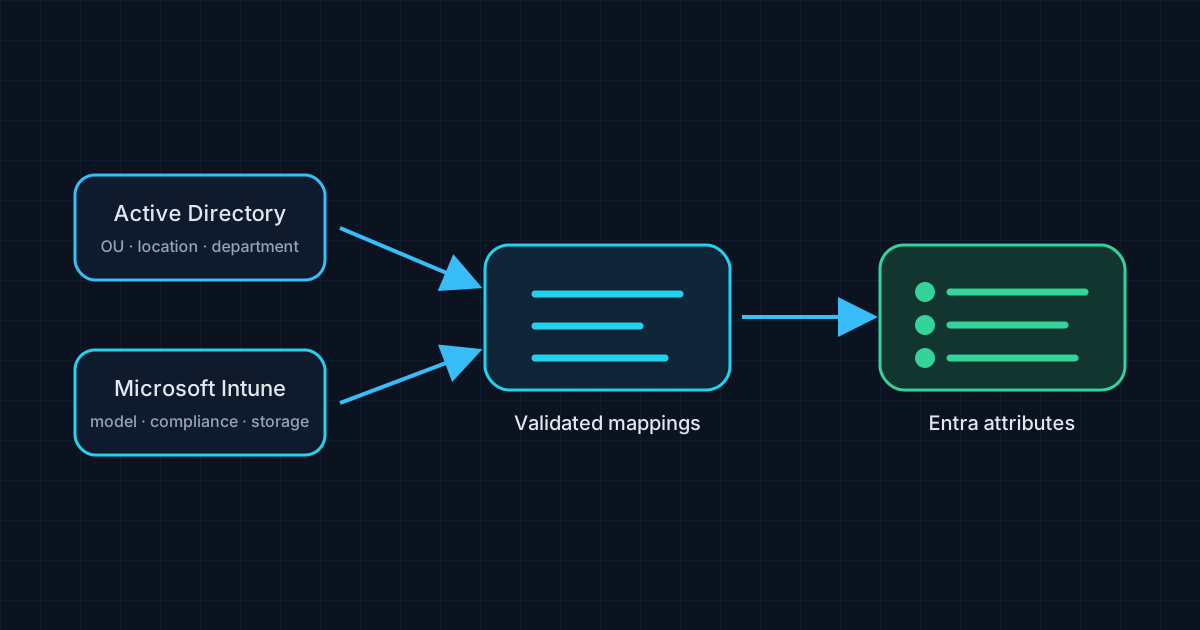
Extension Attributes Automation: turning device data into directory context
Device inventory is useful on its own, but operational workflows often need a small, consistent piece of device context available alongside the Entra device object. Manually keeping that metadata aligned across on-premises Active Directory, Intune, and Entra ID quickly becomes repetitive—and a stale attribute can be more confusing than an empty one.
Extension Attributes Automation is a .NET worker service that synchronizes configured Entra extension attributes from Active Directory and/or Intune. The project brings those sources into one mapping model and adds scheduling, diagnostics, retry behavior, notifications, health checks, and a web dashboard around the recurring work.
The rationale: one target, more than one source
The feature gap is not that an administrator cannot read a device property from AD or Intune. It is the lack of one controlled, repeatable process for mapping selected source values to target extension attributes, especially when a deployment needs to use both data sources.
The repository's unified mapping configuration records the target extension attribute, source attribute, data source, optional regular expression, and default value. The helper validates the configuration before processing and rejects duplicate target mappings, avoiding an ambiguous “last writer wins” interpretation for the same extension attribute. It then obtains the Entra device set and processes device mappings with a semaphore-limited degree of concurrency.
That design favors explicit configuration over one-off scripts. A mapping can say, in effect, “for this target field use this source, extract this part, and use a defined fallback when the source is missing.” The fallback should be chosen carefully: “Unknown” is operationally honest; a plausible but fabricated value is not.
Resilience when Graph says “not yet”
Microsoft Graph can throttle clients, so a scheduled worker should not turn a temporary 429 into a permanent gap in synchronization. The project defines a Graph-specific Polly policy that honors Retry-After when present, otherwise uses exponential backoff with jitter, and logs retry attempts.
Code excerpt: honor the service's retry window
This abbreviated excerpt from PollyPolicies.cs shows the bounded retry count and the server-directed delay.
.WaitAndRetryAsync(
    retryCount: 5,
    sleepDurationProvider: (retryAttempt, outcome, context) =>
    {
        if (outcome.Result?.StatusCode == HttpStatusCode.TooManyRequests)
        {
            var retryAfter = outcome.Result.Headers?.RetryAfter;
            if (retryAfter?.Delta.HasValue == true)
                return retryAfter.Delta.Value;
        }

        var baseDelay = TimeSpan.FromSeconds(Math.Pow(2, retryAttempt));
        return baseDelay.Add(TimeSpan.FromMilliseconds(Random.Shared.Next(0, 1000)));
    });
The real policy also handles an HTTP-date form of Retry-After, transient HTTP failures, and warning logs. Retries are bounded; they are a recovery strategy for temporary pressure, not a promise that Graph will eventually succeed.
Components and data flow
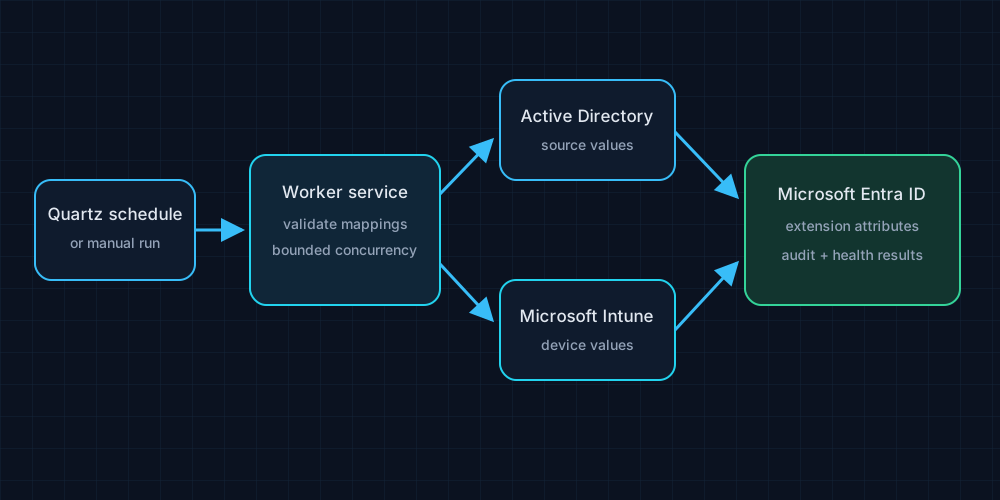
The worker can run as a Windows service or in console mode for controlled testing. Quartz.NET provides scheduled jobs, while the helper layer separates AD, Intune, and Entra interactions. The web dashboard exposes operational status and device-processing functions, and health checks cover configuration and the connected directories/services. Notifications can surface failures without requiring an operator to tail logs continuously.
Before adopting it
The application writes directory attributes, so validate mapping ownership, source quality, Graph application permissions, certificate or secret storage, and the target tenant before enabling scheduled writes. Start with a narrow mapping set and a small test cohort; compare source values with the resulting Entra object and inspect the audit trail. Treat default values and regular expressions as data-governance rules, not just string-processing conveniences.
The project is GPL-3.0 licensed; review its LICENSE and the repository before reuse. This article's implementation references are pinned to a40c4be. Automation can keep metadata in sync; it cannot decide whether the mapping is a good idea. That still requires an administrator.