Series · Foundry Local: from local inference to useful file organization · Part 1 of 3
Foundry Local · Local AI · ONNX Runtime · OneDrive · .NET
Foundry Local, part 1: how local AI works
What runs on the device with Foundry Local, how models get there, and where local folder suggestions end and OneDrive synchronization begins.
- Drafted
- Published
- Updated
- Reading time
- 11 min
- Author
- Roberto Gramellini
Source: Owner-authorized file-organization implementation (private repository)
- on-device inference
- execution provider
- model cache
- local file classification
- Foundry Local architecture
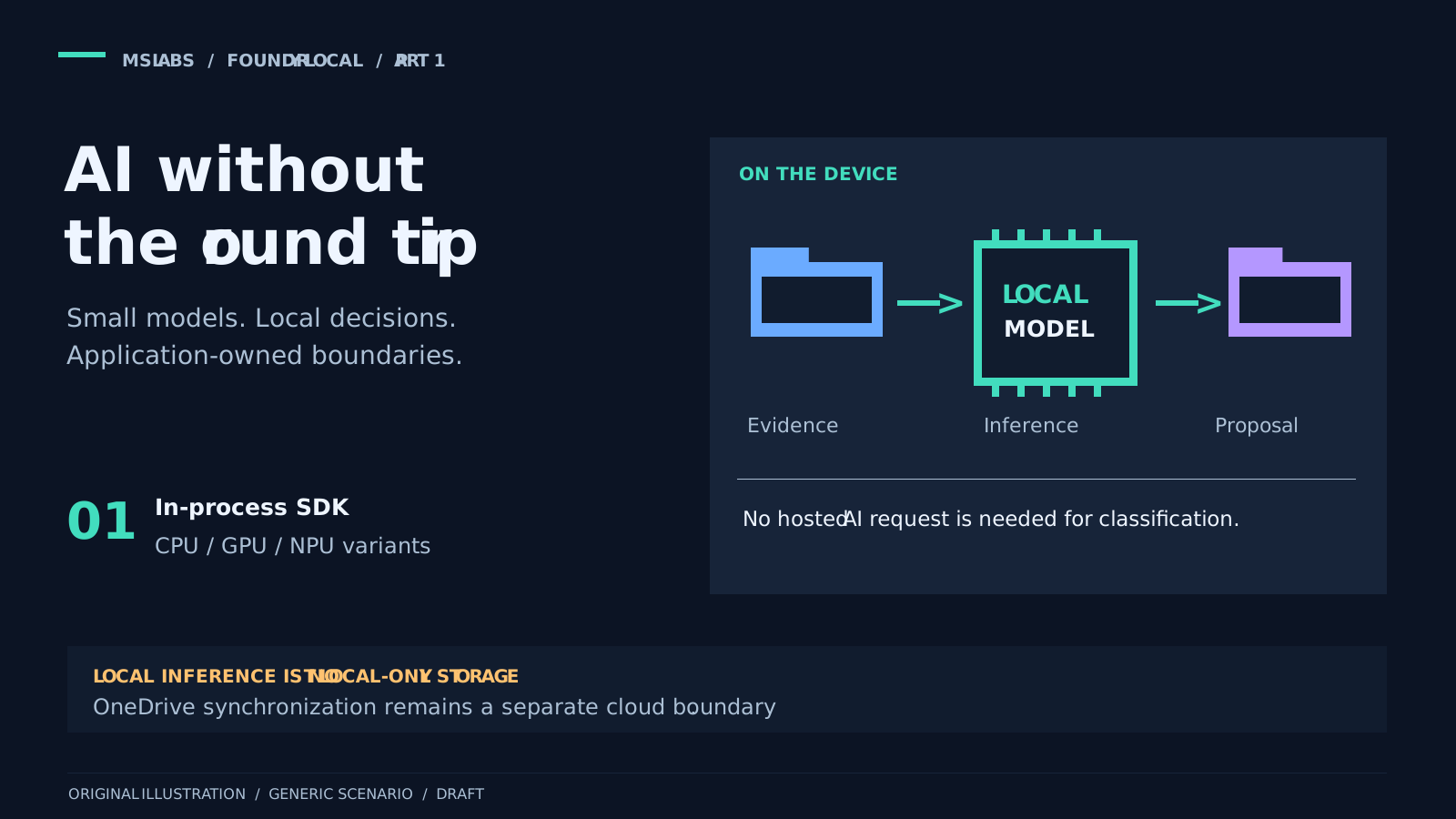
Take a device with proposals, invoices and project notes scattered across local folders. You can move the lot into OneDrive, but you still have to find things afterwards. Calling the destination "To sort" is tempting. It also gives tomorrow's administrator a job, who may well be you.
The idea here is to ask a local language model for a folder suggestion. Start with the filename, parent folder and source-relative path. If that is not enough, an explicitly enabled content path can add a limited text excerpt. Application code still decides whether and how to transfer the file. Neither model request needs a hosted AI endpoint.
Foundry Local handles acquiring and caching the model, running it on supported hardware and making inference available to the application. The filing policy is our problem. So are permission to move files and the separate OneDrive synchronization process.
I am using a file-organization application to show how this can work, without going through the rest of that project. Here I will look at Foundry Local itself. In part 2 we get to the classifier; part 3 covers getting the model and runtime ready before the scan.
OneDrive does not decide where the invoice belongs
OneDrive synchronizes content inside its configured roots. Known Folder Move can bring supported Windows folders into those roots. Neither tells this application which project or topic an eligible file belongs to. That is the extra decision we are trying to make.
I would keep extension rules. They are cheap, predictable and easy to explain. Unfortunately a proposal and an invoice can both end up under "Documents." A model may do better with a meaningful name and parent folder; give it Document1.docx in Downloads, though, and there is not much to work with. A bounded content excerpt gives it something more useful, without letting it roam through documents.
This is aimed at endpoint developers and administrators who want to add AI assistance to an otherwise deterministic workflow. I am not suggesting unrestricted model access to a user profile. Retention, sensitivity labels and records-management policies still apply.
Local inference is worth considering when inputs are modest, decisions can be made independently, and sending them to cloud AI is undesirable. You still pay for it in device resources and dependency management. Accuracy is something to measure, not a benefit to assume.
What actually runs on the device
According to the current architecture documentation, the native Core API loads into the application's process. C#, JavaScript, Python and Rust SDKs sit above it. ONNX Runtime executes the model through execution providers for the available supported hardware.
For this native SDK route, you do not need an Azure subscription, a hosted deployment, an API key or a separate Foundry Local CLI installation. There is an optional OpenAI-compatible REST endpoint for HTTP integrations. Native inference does not require it.
Keep that in mind when comparing examples. A loopback HTTP service and a library loaded into the application are both local, but they have different startup arrangements, process ownership and endpoint security. The implementation used here takes the native route and never starts that optional listener.
The application targets .NET 10 with Microsoft.AI.Foundry.Local 2.2.1 pinned. Microsoft's SDK reference also separates the cross-platform package from the Windows-specific WinML package. Check which package and platform an example uses before copying it; SDK generations are not interchangeable.
Follow the calls, and then the network traffic
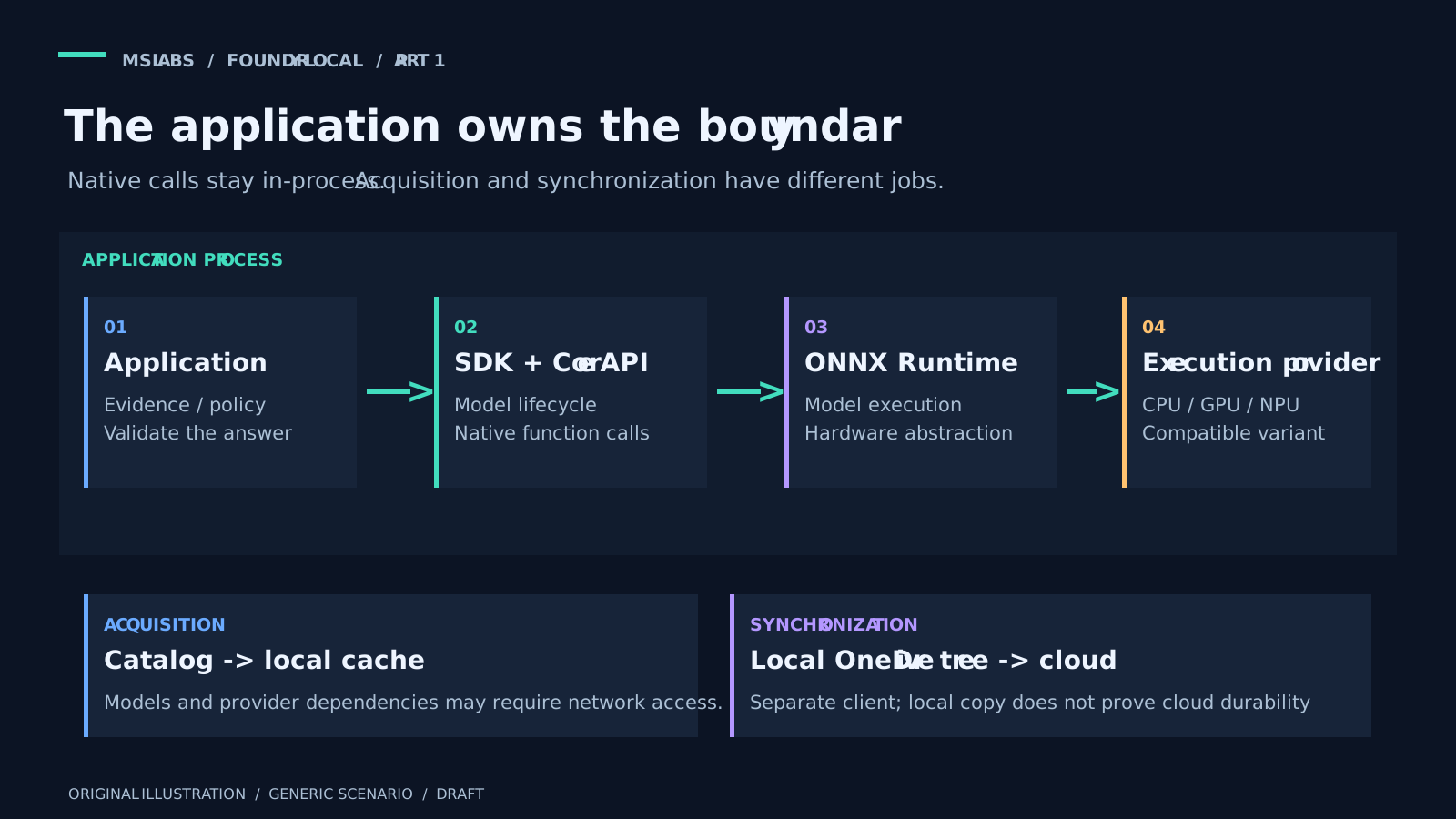
Here is how I would read the diagram.
Start with the application. It selects permitted models, prepares the question, checks the answer and decides whether a filesystem operation can follow.
The optional document extractor belongs to the application too. Guarded capture and a short-lived parser process with resource limits prepare the text before inference. The diagram shows the inference host; the parser runs separately, not inside that host.
Next, the SDK and Core API provide discovery, acquisition, loading, inference and unloading. The native library is in-process, so there is no inference daemon to start for this route.
Underneath, ONNX Runtime and its execution providers run the model on compatible CPU, GPU or NPU hardware. What is available depends on the platform, package, model variant and drivers. Windows architecture includes WinML integration for provider acquisition and registration. Other package/platform routes differ.
Finally, the model catalog and local cache supply the artifacts and keep them on disk. The alias names a family; the concrete variant is the hardware-specific artifact you will run. The application is free to approve fewer choices than the SDK would select automatically.
Downloading models or execution providers may need network access. Once those artifacts are available, inference can happen without sending the prompt to a cloud model. I would be careful about describing the whole application as offline, though.
We are deliberately putting files under a OneDrive sync root. OneDrive may then upload them according to its account, policy and synchronization state. Choosing their folders locally does not prevent that upload. Nor does a successful local copy prove the file is durable in the cloud.
A downloaded model still has to load
Downloading leaves files in the cache. Loading takes memory and runtime resources. Inference uses those resources, and unloading releases the loaded state without necessarily removing the files. These are separate operations, which is easy to forget when the UI just says "model ready."
A few common observations make more sense with that distinction:
| Observation | What it actually means |
|---|---|
| The application installed successfully | Application binaries are present; model/provider readiness is still a separate question. |
| The model is cached | Its files are available; loading and an execution provider may still fail. |
| A startup probe succeeded | A bounded inference attempt completed at that time; future categorization can still fail. |
| The model was unloaded | Memory was released; cached files can remain available for reuse. |
This application adds approved aliases, an optional exact variant, hardware preference, model-size limits, download permission and a free-disk reserve. Within an approved alias it prefers an eligible cached variant over a new download. Refreshing the catalogue does not, on its own, authorize replacing a usable approved cache entry.
Foundry Local supports hardware abstraction and CPU execution, but application policy may be narrower. If the policy requires an NPU variant, quietly substituting an unrelated CPU variant is not acceptable.
The native call in code
This is the complete adapter method. Its enclosing adapter owns the SDK IModel handle, model, which the caller has already selected and loaded. Fixed instructions arrive in systemMessage, bounded user input in metadata. The two numeric budgets limit generation and buffering.
public async Task<byte[]> CompleteAsync(string systemMessage, string metadata, int maxTokens, int maxBytes,
    CancellationToken cancellationToken)
{
    using var session = new ChatSession(model);
    session.SetOptions(new RequestOptions
    {
        Search = new SearchOptions { Temperature = 0, MaxOutputTokens = maxTokens }
    });
    session.SetStreaming(true);
    using var request = new Request();
    request.AddItem(MessageItem.System(systemMessage));
    request.AddItem(MessageItem.User(metadata));
    var content = new StringBuilder();
    var bytes = 0;
    await using var stream = session.ProcessStreamingRequestAsync(request, cancellationToken);
    try
    {
        await foreach (var item in stream.WithCancellation(cancellationToken))
        {
            using (item)
            {
                cancellationToken.ThrowIfCancellationRequested();
                if (item is not TextItem text) continue;
                bytes = checked(bytes + Encoding.UTF8.GetByteCount(text.Text));
                if (bytes > maxBytes)
                {
                    throw new InvalidOperationException("Native response exceeded the maximum size.");
                }

                if (text.Type != TextItemType.Reasoning) content.Append(text.Text);
            }
        }

        using var final = await stream.FinalResponse;
        if (final.FinishReason == FinishReason.Error)
        {
            throw new InvalidOperationException("Native inference reported an error.");
        }
    }
    finally
    {
        // A size-limit exception must also stop generation. StreamingResponse disposal waits
        // for the native invocation before request/session/model handles can be released.
        request.Cancel();
    }

    var response = JsonSerializer.SerializeToUtf8Bytes(new
    {
        choices = new[] { new { message = new { content = content.ToString() } } }
    });
    if (response.Length > maxBytes)
    {
        throw new InvalidOperationException("Native completion envelope exceeded the maximum size.");
    }

    return response;
}
This complete adapter method uses Microsoft.AI.Foundry.Local 2.2.1 and .NET's System.Text and System.Text.Json. It belongs inside the application's model adapter, not in an otherwise empty console project.
The method turns input into SDK message items. There is no HTTP payload here. Cancellation applies while reading the stream, and every text chunk counts towards the UTF-8 budget, including reasoning chunks excluded from the answer. There is another size check after serializing the completion envelope, because JSON framing and escaping cost bytes as well.
I would pay attention to the finally block: it cancels generation even when a size check throws. Stream and handle disposal must finish as part of the operation, before model unloading can race ahead. The returned envelope simply fits the application's existing parser. Producing that familiar shape does not start a web listener.
The method does not decide whether an answer makes sense or names a safe destination. We will leave that to part 2's resolver and organizer. Selection, acquisition, loading and unloading sit in part 3's lifecycle coordinator.
What if the filename tells us nothing?
The question is deliberately small: suggest a folder from bounded evidence, or return {"relativeDirectory":null} when there is not enough. I find that a more useful starting point than asking a model to tidy an entire computer or invent an enterprise taxonomy.
The classifier starts with the parent folder, name and relative path. A parent called Finance may be enough for Document1.docx. Only an explicit abstention lets the enabled content path extract a bounded excerpt from a supported TXT, DOCX or textual PDF and ask the same local provider once more.
Content inspection is off by default and needs an approved category list. A generic filename alone does not trigger it. Neither does a malformed answer or provider error. Also, protection is inspected before metadata inference or cache reuse: "metadata first" refers to the model's input. The application has already read bounded source bytes.
In content mode the answer must be a configured category, or an abstention. Accepted output is mapped back to that canonical category. Names or account numbers in a document cannot simply become new folder names. Part 2 goes through the checks.
This can still be wrong. The relevant page may be outside the excerpt, the name may be misleading, or the text may contain instructions aimed at redirecting the model. A small model can select the wrong approved topic. Temperature zero guarantees neither accuracy nor identical results between runtime versions, and this implementation does not claim OCR or whole-document understanding.
Measure the complete workflow on representative devices, including RAM, disk, CPU/GPU/NPU usage, battery and heat. I do not have a universal inference-speed or accuracy figure to offer here.
A few things "local" does not solve
Filenames and paths can already reveal confidential subjects; extracted text can reveal much more. This application keeps excerpt-bearing requests on explicitly selected local providers, rejects them in the shared Azure routing path and does not persist raw excerpts, prompts or answers. Paging, crash dumps and other processes running as the same user still need consideration.
The parser's Windows job limits resources. It is not an OS security sandbox. Recognized protection or sensitivity markers lead to rules fallback, but that is not a comprehensive Purview/DLP assessment. Protect cached decisions, workflow logs and the destination folder tree as well.
The native adapter uses fixed per-user storage, rejects LocalSystem acquisition, disables nonessential SDK telemetry and does not start a REST listener. Its lifecycle logs leave out prompt and answer payloads. That reduces specific exposures. It does not prove that every log in the rest of the application is free of personal metadata.
Above all, keep treating the answer as untrusted input. Valid syntax does not make a path safe or a classification sensible. The application has to check the proposal and whether it is allowed to act on it.
Where to go next
Explore the public Foundry Local repository and Microsoft's quickstart for the platform itself.
Next: turn a local model's answer into a validated folder proposal.