Microsoft Intune · BitLocker · PowerShell · Custom Compliance · Endpoint security
Diagnosing BitLocker compliance in Intune
Find out why an encrypted device can fail compliance, what the repair script can fix, and where local escrow clues, policy differences and truncated reports can mislead.
- Drafted
- Published
- Updated
- Reading time
- 10 min
- Author
- Roberto Gramellini
Source:
Intune BitLocker Compliance
· revision 6b8eef45
- IntuneBitLockerCompliance
- BitLocker non-compliance reasons
- Intune Custom Compliance
- BitLocker escrow evidence
- Company Portal
- Intune Remediations
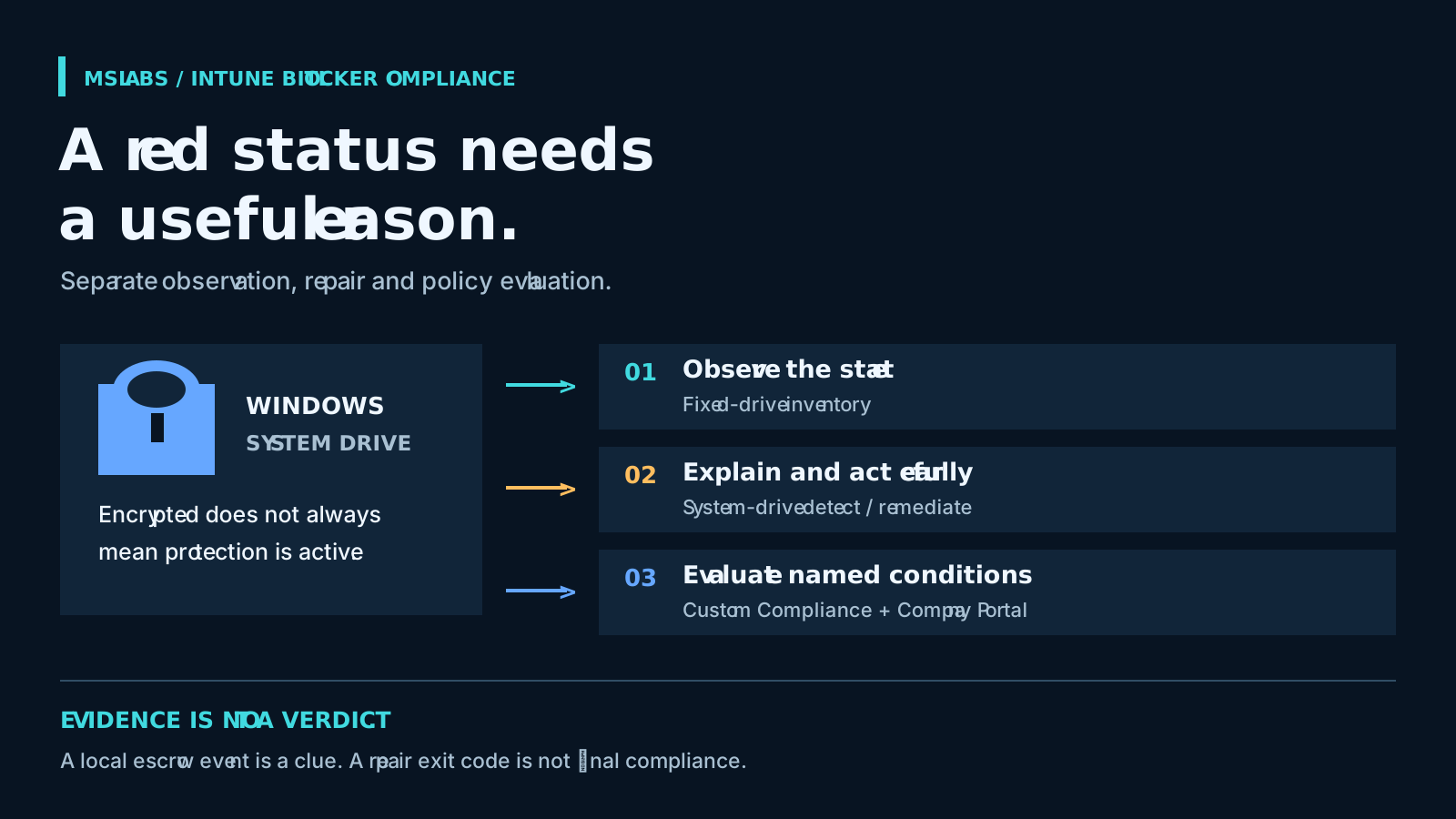
Diagnosing BitLocker compliance in Intune
The ticket says BitLocker is non-compliant. The system drive is encrypted. Before asking the user to sync again, I'd want to know what actually failed: suspended protection, incomplete encryption, the wrong algorithm, or simply missing local evidence of recovery-key backup.
Each answer needs a different response. Without that detail, troubleshooting easily becomes a small administrative ceremony: another screenshot, another sync, another meeting to agree that the status is still red.
IntuneBitLockerCompliance gives endpoint engineers, compliance administrators and support teams more useful detail through PowerShell and Intune. It records what is on the device, diagnoses what needs attention, and exposes named custom compliance conditions. Microsoft's BitLocker management and encryption policies remain in place; these scripts add diagnosis rather than replacing them.
This walkthrough describes revision 6b8eef45f5b5b80f541ff3cf26ff9a35f49be0d4. Implementation references are pinned to that revision. No license file or declared license was found there; the article therefore uses original explanations and an original illustrative output example rather than reproducing source code.
Ask a more useful question than "encrypted?"
Intune already configures BitLocker, reports encryption and evaluates compliance. What this project adds is a compact explanation connecting the observed state to a possible support action. An aggregate encryption requirement does not always provide that explanation on its own.
Even a single drive has several answers: method, percentage complete, volume state, protection state and protector types. A fully encrypted volume with suspended protection needs different investigation from a volume holding plaintext. And finding a recovery-password protector locally does not tell you whether its recovery information is available in Entra ID.
The scripts expose these observations through three paths:
| Path | Question answered | Output and effect |
|---|---|---|
| Inventory | What configuration exists on the accessible fixed drives? | A structured state snapshot; no compliance verdict or changes |
| Remediations | Why does the system drive fail this detector's requirements? | Diagnostic reasons and a narrow repair attempt when detection exits 1 |
| Custom Compliance | Which declared conditions should Intune evaluate? | Flat discovery values matched to JSON rules, with English and Italian user guidance |
Use them together if helpful, but keep their results separate. One difference is easy to miss: the detector's default encryption requirement is stricter than the main Custom Compliance rule.
Collect the inventory without asking it for a verdict
Start with Inventory/Detect-BitLockerState.ps1 when you need observations. It enumerates fixed logical disks and queries each mount point for protection and volume status, algorithm, encryption percentage, lock state, protector types and auto-unlock information. It also includes a TPM summary.
That covers more than the compliance scripts, which inspect the system drive. It still does not discover every conceivable volume. Enumeration uses fixed logical drives with mount points; if it fails, collection falls back to the system drive.
The output starts with readable lines, followed by a compact BITLOCKER_STATE= payload. Exit is always 0, even after collection errors. For an inventory-only Remediations package, that avoids asking Intune to launch a repair merely because an observation was collected.
So "Without issues" does not certify encryption, or even successful collection. Read the error fields, look for missing volumes and check freshness before using this inventory as assurance evidence. I'd leave missing data visibly unknown.
Let the detector explain the failure
For operational reasons, use Remediations/Detect-BitLockerCompliance.ps1. Its requirements are configurable. The defaults at this revision require active protection, a fully encrypted system volume at 100 percent, an encryption-method rank meeting XtsAes256, and exact Tpm and RecoveryPassword protector types. They also require recovery-key escrow evidence.
The detector builds a reason list and writes it alongside BITLOCKER_DIAG= JSON. Failed requirements produce exit 1, telling Intune Remediations to invoke the paired repair. With no reasons, it returns 0.
The following is an original, simplified interpretation example, not captured device output or a source-code excerpt:
{
  "ProtectionStatus": "Off",
  "VolumeStatus": "FullyEncrypted",
  "EncryptionPercentage": 100,
  "Interpretation": "Encryption is complete, but protection is not active."
}
That combination is a reason to investigate suspended protection. Starting encryption again is not the obvious answer, and the snapshot alone does not authorize a repair.
Recent BitLocker error events are attached for diagnosis; their presence alone does not add a failure reason. More surprisingly, an unexpected detection exception writes an error payload and exits 0. That prevents failed collection from triggering repair. It can also make a failed observation look like a healthy run if nobody reads the diagnostic record.
Keep the repair small, and run detection again
The paired Remediations/Remediate-BitLockerCompliance.ps1 does much less than the detector measures. It can resume protection on a fully encrypted volume where protection is off, and attempt Entra backup of existing recovery-password protectors. It does not start encryption, change algorithms or add, rotate or delete protectors.
When backup is enabled, the remediation attempts it for each existing recovery-password protector every time it runs. A fresh authoritative escrow lookup does not gate that attempt. Successful command output tells you about the command, not independently about the directory's recovery record.
A small repair is still a change. Resuming protection may conflict with planned maintenance. Confirm why protection was suspended and verify recovery access before authorizing it.
Read the executable checks more carefully than the optimistic comments here. The remediation does not re-evaluate all detector requirements before returning success. It explicitly checks command failures, missing recovery-password protectors and certain unencrypted-volume states. A missing TPM protector or wrong algorithm can remain after exit 0.
I'd always rerun detection and read the remaining reasons. A successful remediation is not the final compliance verdict. It means the repair's own checks passed, which is a narrower claim.
Give Company Portal something useful to say
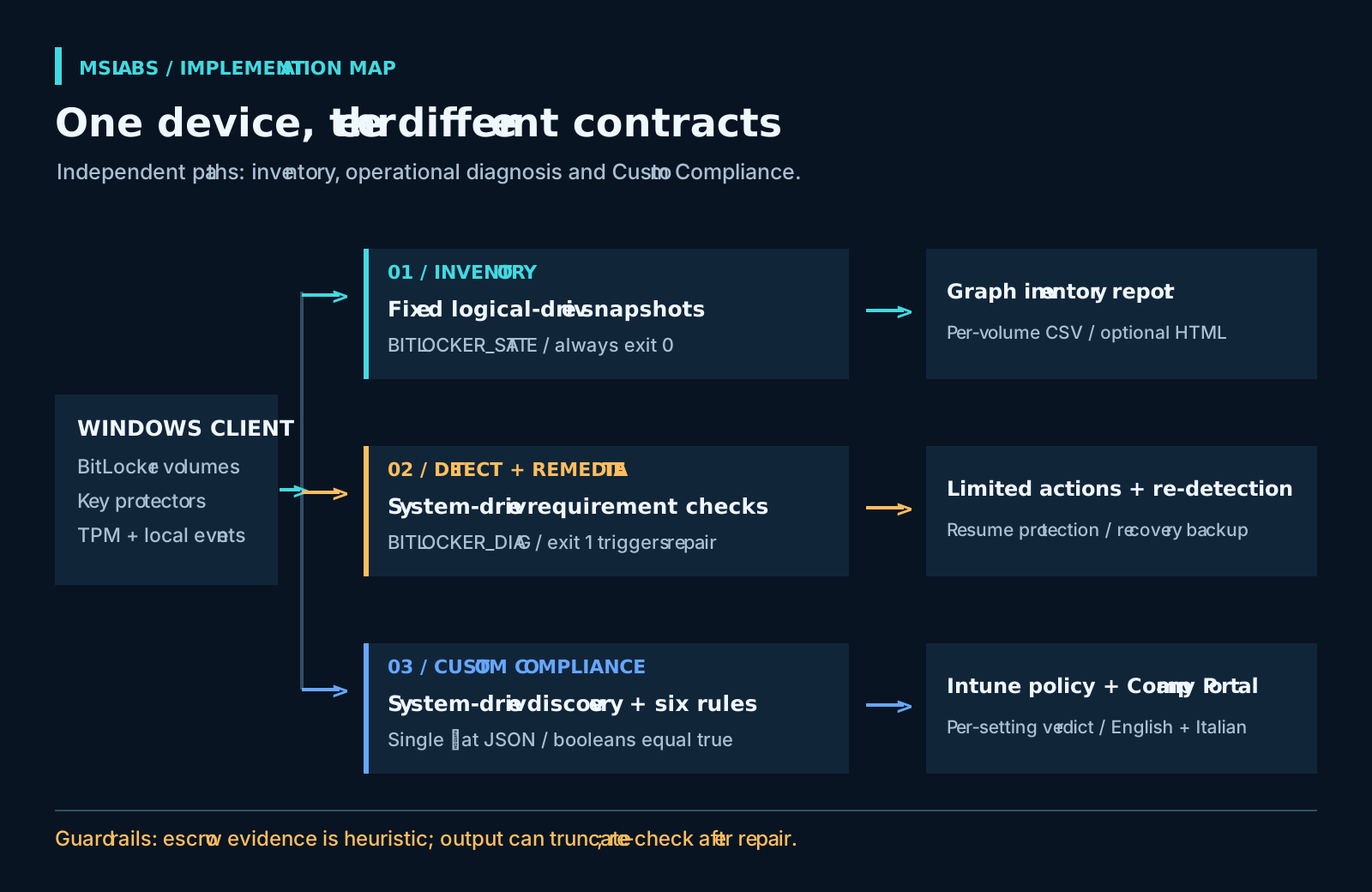
The discovery path starts in CustomCompliance/Discover-BitLocker.ps1. It returns one compressed, flat JSON object with named conditions: BL_IsProtectionOn, BL_IsVolumeFullyEncrypted, BL_IsEncryptionComplete, BL_IsEncryptionMethodXts, BL_HasTpmProtector, and BL_HasRecoveryPasswordProtector.
The paired BitLockerComplianceRules.json compares each of those six booleans with true. Each rule includes English and Italian guidance for Company Portal. Other raw fields provide diagnostic context; they are not evaluated just because discovery emitted them.
Users get an explanation of the failed condition while engineers retain the detailed observations. Discovery itself changes nothing on the device.
Be careful choosing the pair. The main discovery and rules accept XTS-AES 128 or XTS-AES 256; Remediations defaults to XTS-AES 256. The AES128 discovery variant and matching rules accept exactly legacy Aes128 or XtsAes256. The filename is not a promise of "128-bit or stronger": XtsAes128 is excluded.
Also test the exact protector requirement against your boot-authentication design. A requirement for Tpm does not automatically accept a combined TPM-and-PIN type. Do not discover that mismatch only after assigning the compliance policy broadly.
Check escrow in the directory
For escrow, the scripts use Entra join status and matching Event ID 845 messages in the local BitLocker management log. Events may be missing, rotated away or inaccessible. The local indicator can therefore be false after a successful historical backup.
The main Custom Compliance rules leave BL_IsRecoveryKeyEscrowedInEntraId out of the six evaluated conditions, although discovery emits it. Remediations still requires the local heuristic by default. If the two paths disagree, check their requirements before suspecting corrupted output.
Verify directory availability through authorized Entra recovery-key records. A missing local event does not prove backup never happened. Nor is this a reason to collect recovery passwords in bulk: the secret itself belongs in neither a general diagnostic export nor an article example.
Reports depend on what Intune retained
Reporting uses two operator-run scripts; there is no extra hosted backend. Get-BitLockerComplianceReport.ps1 queries Graph's beta deviceHealthScripts run-state endpoint, follows pages and looks for the diagnostic marker in pre-remediation detection output. It exports a row per device run record and can generate an HTML summary grouped by reason.
For inventory, Get-BitLockerInventoryReport.ps1 reads both detection-output locations and expands volume arrays into individual rows. Its fallback when arrays are absent does not translate every other diagnostic schema completely. Pair the report with the collection path it was designed to read.
Both scripts expect an authenticated Microsoft Graph PowerShell context and document DeviceManagementManagedDevices.Read.All and DeviceManagementConfiguration.Read.All. Ask an authorized administrator to review access and consent for the chosen authentication model. Validate the returned fields before scheduling exports: beta APIs can change, whether or not the reporting schedule noticed.
The less visible limit is output size. Microsoft's Remediations documentation allows 2,048 characters. Readable lines, multi-volume data, errors and JSON share that allowance. Here JSON comes after the readable output, so truncation can cut or entirely remove the marker payload. Graph cannot recover bytes it never received.
The parsers tolerate JSON failures, which means a report can contain rows with missing diagnostic values. Treat those as unknown, not compliant. Before accepting a fleet percentage, check completeness, collection errors and last-update times. Also read the inventory report's "Encrypted" result carefully: it combines protection-on and fully-encrypted state, so a negative result does not necessarily mean plaintext storage.
Pilot diagnosis before enforcing access
Start on supported, Intune-managed Windows clients. The repository targets Windows 10/11, not Windows Server; confirm current OS support and license eligibility. Remediations has separate join, management and licensing requirements in the Microsoft documentation.
Use SYSTEM and 64-bit PowerShell for this system-level collection, as the project describes. Keep inventory, detection/repair and Custom Compliance assignments distinct. Upload Custom Compliance discovery before selecting it in the policy, then use its matching rules. Microsoft's discovery-script guidance requires compressed one-line JSON for the Windows output.
The repository recommends signed discovery with signature enforcement. I'd use that when the certificate and trust lifecycle is managed. It is a configurable Intune setting, though, not a platform rule universally rejecting every unsigned discovery script. If you enable enforcement, supply a valid signature and trust rather than switching the control off to hurry a rollout.
Exercise suspended protection, unfinished encryption, an unexpected algorithm, alternative TPM protector types, missing recovery protectors, absent escrow events and deliberate collection failures. Check both Company Portal and the operator report. Review non-compliance actions and Conditional Access dependencies before broad assignment. Diagnosis should not accidentally become an access-blocking experiment.
Exported reports still need handling rules. They contain device names, user principal names, timestamps and raw diagnostics even though they do not export plaintext recovery passwords. Restrict access, set retention and sanitize before sharing.
Close the ticket with a reason
The useful result is a reason someone can act on, with enough detail to understand its limits. Keep observation, repair and compliance evaluation separate in the operating procedure. Inventory exit 0 says nothing conclusive about security, local escrow events cannot certify directory availability, and a repair still needs another detection run. That is more work than reading a color, but much less guessing.
Explore the repository at the reviewed revision and start with a small, controlled group. At this revision, no license is declared; do not assume MIT or another permissive grant, and clarify reuse terms before copying or redistributing the source. The article's prose and illustrations are original; no source-code excerpts are reproduced.