Microsoft Intune · Microsoft Graph · Blazor Server · .NET · Scope Tags
Intune Tag Manager: moving scope-tag work out of the request path
How Intune Tag Manager turns scope-tag assignments into background jobs, reports progress through SignalR, and uses Microsoft Graph batching and retry handling to make bulk operations easier to operate.
- Drafted
- Published
- Reading time
- 4 min
- Author
- Roberto Gramellini
Source:
Intune.TagManager
· revision 8f266284
- Intune Tag Manager
- Intune scope tags
- Graph API batch
- SignalR job progress
- Intune bulk operations
Intune Tag Manager: moving scope-tag work out of the request path
Assigning scope tags to a handful of objects is straightforward. Doing it across a large set of devices or Intune objects raises a different set of questions: how long will the operation take, how can an operator see progress, and what happens when Graph throttles one portion of the work?
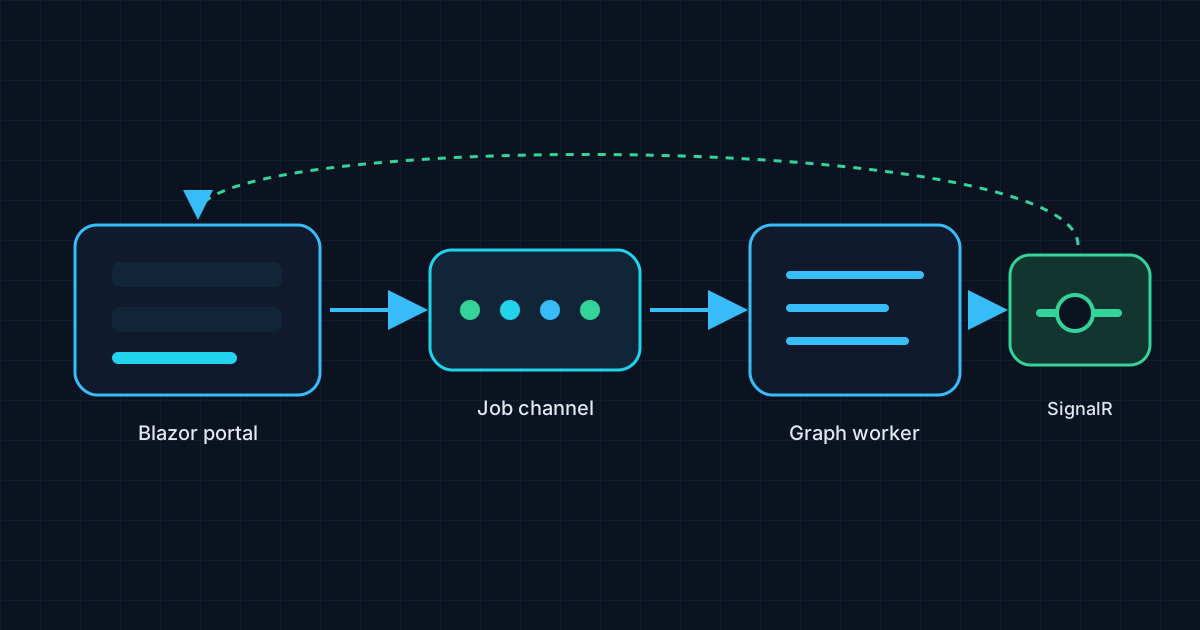
Intune.TagManager is a Blazor Server application for managing Intune Scope Tags at scale. Its design moves longer operations away from the UI request path: the web layer creates a job, an in-process channel queues it, and a background worker executes it while progress updates flow back through the application and SignalR.
Why model operations as jobs?
A long-running bulk update should not depend on one browser request remaining open until every Graph call finishes. Separating submission from execution gives the interface a job identifier and a status surface that can report processed, successful, and failed items as the operation advances.
The repository is split into a Core library for shared models and Graph-related services, a Worker for background execution, and a Blazor Server application for the operator experience and API. Scope-tag assignment and report-generation jobs implement a common executor contract. The worker reads requests from the channel, updates job state, and forwards progress callbacks for the SignalR hub.
Code excerpt: queue work for one background consumer
This excerpt from JobChannel.cs shows the in-process queue configuration and enqueue operation.
_channel = Channel.CreateUnbounded<JobRequest>(new UnboundedChannelOptions
{
    SingleReader = true,
    SingleWriter = false
});

public async ValueTask EnqueueAsync(JobRequest request, CancellationToken ct = default)
{
    await _channel.Writer.WriteAsync(request, ct);
}
An unbounded channel is simple and allows multiple request producers, while SingleReader matches the worker's consumption model. It is also an explicit operational trade-off: this queue is in process, not a durable broker, and this configuration does not apply backpressure by queue length. Deployments should account for restart behavior and avoid treating an accepted in-memory job as durable work.
Graph batching is an optimization, not a transaction
For bulk device lookup, the Graph service groups identifiers into batches using the configured request limit, then submits a $batch request. It examines individual response statuses and can retry only the throttled subrequests rather than rerunning every successful item. The README documents a maximum batch size of 20 requests, consistent with Graph's batch request limit; the actual configuration should still be checked against the deployed build.
Batching reduces round trips, but a batch is not an all-or-nothing transaction. One subrequest can fail or be throttled while others succeed. That is why partial-result handling and per-item progress matter more than a single green “batch complete” message.
Architecture and feedback
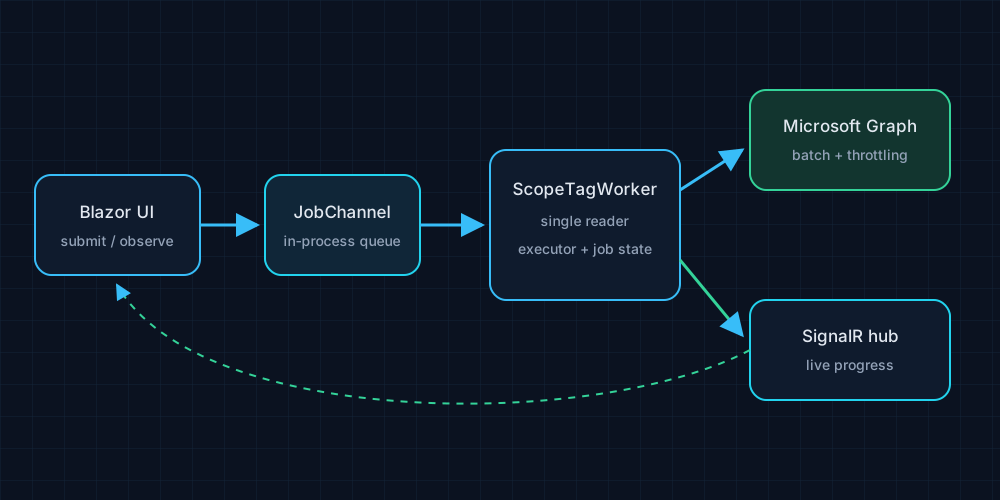
The UI submits work through the job API and observes status and progress. The worker chooses the executor for each job type, calls the shared Graph/report services, updates counts and status, and emits progress callbacks. The SignalR hub carries those changes to the connected browser so operators do not have to refresh the page and hope for the best.
The application supports certificate or client-secret authentication, CSV report export, name-pattern filtering, and retry/backoff for Graph throttling. Use an approved app registration with only the permissions needed for the operation, keep credentials in User Secrets or Key Vault rather than source-controlled settings, and test write operations against a limited cohort first.
Intune.TagManager is MIT-licensed. Its repository includes the web, worker, and core projects, API endpoints, and setup guidance; source references in this draft use the pinned revision 8f26628. The queue makes bulk work easier to follow—not immortal. For that, you would need durable storage, not optimism and a browser tab.