Series · BitLocker Key Monitor: proving recovery keys exist · Part 1 of 3
Intune · BitLocker · Entra ID · Active Directory
BitLocker recovery keys: trust, but verify (then verify again)
Part 1 of 3. Why we built a hybrid monitor that proves BitLocker recovery keys exist in AD and Entra with matching values, and how its scanner and consistency model work.
- Drafted
- Published
- Reading time
- 5 min
- Author
- Roberto Gramellini
Source:
BitLocker Key Monitor
· revision 6390107e
- BitLocker recovery key
- Intune
- Entra ID
- Active Directory
- key escrow
- consistency check
- Quartz.NET
- device management
- hybrid join
- audit
Every Intune admin has lived this scene. A laptop dies on a Friday evening, the user is locked out at the BitLocker blue screen, and somebody confidently says: "No worries, the recovery key is in Entra." You open the device. The key is not there. Or it is there, but it is the wrong key. Or the device record is gone entirely because someone cleaned up "stale" objects last month.
That Friday is why BitLocker Key Monitor exists. It continuously proves that recovery keys are actually available, in the places you believe they are, with the values you expect. Not "the dashboard is green". Proven.
This is part 1 of a three-part series. Here we cover the problem and the scanner. Part 2 follows one scan across the trust boundary, and Part 3 looks at encryption at rest and the limits we refuse to hide.
The problem nobody puts on a slide
In a hybrid estate, a recovery key can be escrowed to on-premises Active Directory, to Microsoft Entra ID, to both, or to neither. The native views show each side separately. They will not tell you the uncomfortable parts:
- A key exists in AD but was never backed up to Entra (or the reverse).
- Both sides hold a protector, but the recovery password differs.
- A device vanished from one scan and got treated as retired.
- Audit asks, "Can you prove recovery-key availability?" and the honest answer is a spreadsheet.
A vocabulary for "something is wrong"
The scanner reads AD and Entra/Graph, correlates devices across identities, keeps a history of observations and classifies every device. The classification is an explicit, append-only enum, which is exactly what you want when audit asks what a status meant two years ago:
// src\BitLockerKeyMonitor.Core\Models\ConsistencyResult.cs (lines 7-27)
public enum ConsistencyStatus
{
    Consistent = 0,
    MissingInAd = 1,
    MissingInEntra = 2,
    StaleInAd = 3,
    StaleInEntra = 4,
    DeviceNotCorrelated = 5,
    KeyMismatch = 6,
    ScanError = 7,
    /// <summary>
    /// Key with same ID exists in both AD and Entra, but the actual recovery password values differ.
    /// Only detectable when IncludeRecoveryKeyValue is enabled. Indicates corruption or tampering.
    /// </summary>
    KeyValueMismatch = 8,
    /// <summary>
    /// No recovery keys found in either AD or Entra for this device.
    /// The device may not have BitLocker enabled, or keys were not escrowed.
    /// </summary>
    NoKeysFound = 9,
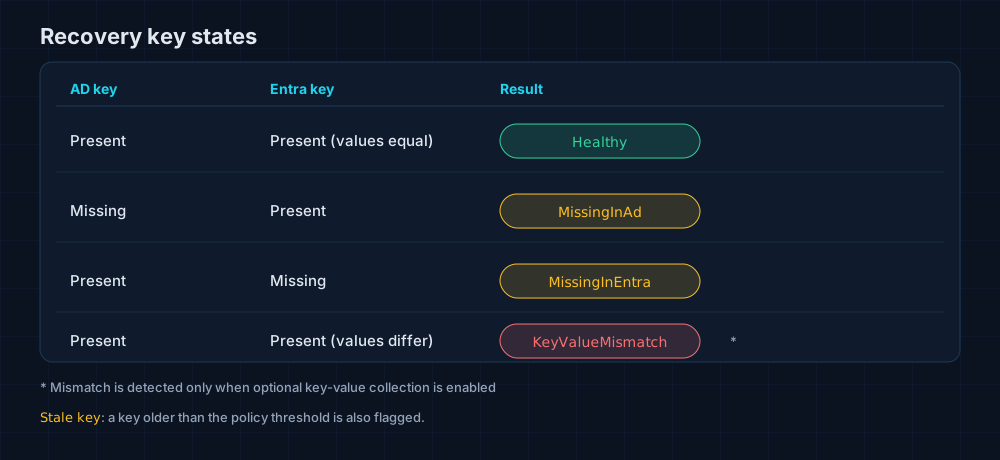
Figure 1. The four states that matter most. A value mismatch is only detectable when key-value collection is explicitly enabled.
KeyValueMismatch deserves a pause. A key that is present but does not match is worse than a missing one, because it looks perfectly fine until the worst possible moment. The catch is that comparing values means handling the secrets themselves, so that mode is optional and deliberately explicit.
Who is who? Correlating devices
An AD computer account, an Entra device and an Intune record are three different objects that happen to describe one laptop. The scan job preloads lookup maps scoped to the scan's data source, and the rule is strict: match on the Entra device ID first, and fall back to the display name only when that name is unique.
// src\BitLockerKeyMonitor.Worker\Jobs\BitLockerScanJob.cs (lines 459-468)
var devicesByEntraId = await db.Devices
    .Where(d => d.EntraDeviceId != null && d.SourceId == scanRun.SourceId)
    .ToDictionaryAsync(d => d.EntraDeviceId!.Value, ct);

var devicesByName = await db.Devices
    .Where(d => d.EntraDeviceId == null && d.SourceId == scanRun.SourceId)
    .GroupBy(d => d.DisplayName)
    .Where(g => g.Count() == 1) // Only use name matching if unique
    .Select(g => g.First())
    .ToDictionaryAsync(d => d.DisplayName, ct);
Name matching is the dangerous heuristic: two machines called LAPTOP-01 in different sites must never swap histories. Scoping by source and refusing ambiguous names turns a nasty class of silent errors into a visible DeviceNotCorrelated.
Architecture of the on-premises flavour
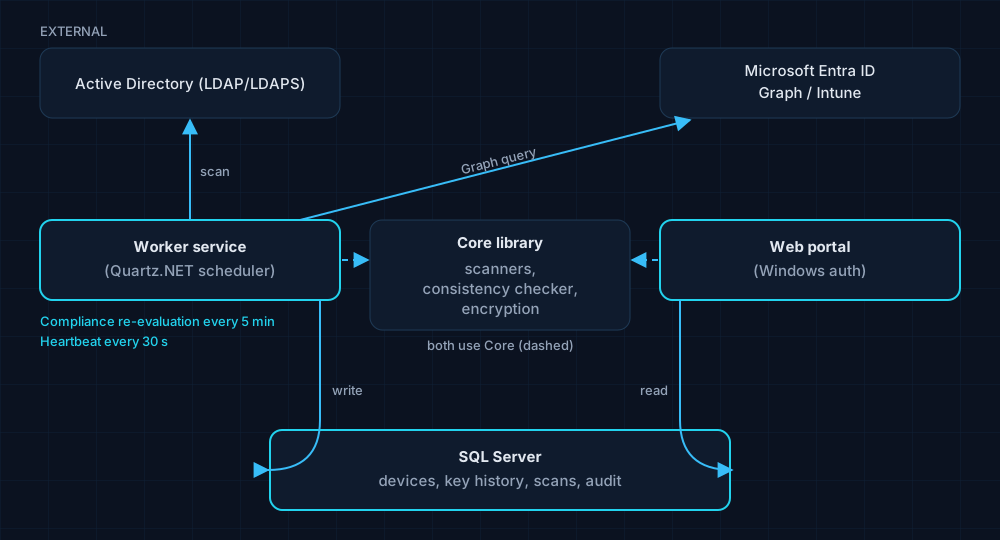
Figure 2. A worker service scans, a Windows-authenticated portal reviews, and SQL Server remembers.
A Windows worker service runs the scans on a Quartz.NET schedule, and the cron expression is plain configuration:
// src\BitLockerKeyMonitor.Worker\Program.cs (lines 371-384)
var cronSchedule = builder.Configuration.GetValue<string>("ScanSettings:CronSchedule") ?? "0 0 2 * * ?";

builder.Services.AddQuartz(q =>
{
    var jobKey = new JobKey("BitLockerScanJob");
    q.AddJob<BitLockerScanJob>(opts => opts.WithIdentity(jobKey));
    q.AddTrigger(opts => opts
        .ForJob(jobKey)
        .WithIdentity("BitLockerScanTrigger")
        .WithCronSchedule(cronSchedule));

    // Listener that logs next-fire-time after each job run
    q.AddTriggerListener<ScanScheduleListener>();
});
The default is a 02:00 scan. Compliance is re-evaluated every 5 minutes and both worker types send a heartbeat every 30 seconds, so "the monitor stopped" is itself something the monitor can tell you.
There is also a RecoveryVault mode that keeps Entra recovery keys independently of AD, including historical keys after a device is retired or deleted. It is an archive, not a consistency checker, and the documentation is refreshingly honest about that.
What changed in how we think
- Escrow is a claim, not a fact. Treat it like any other control and measure it continuously.
- Compare values, not presence. A matching existence check is a very comfortable way to be wrong.
- Be strict about identity. A wrong correlation corrupts every report built on top of it.
An AD scan has to run inside the domain, though, and that is where the design gets interesting. Continue with Part 2: the sealed intake.