Series · BitLocker Key Monitor: proving recovery keys exist · Part 2 of 3
Azure Functions · Key Vault · Security Architecture · Service Bus
A deliberately dumb front door: sealed intake for an AD hybrid agent
Part 2 of 3. How a domain-joined agent ships Active Directory data to Azure using envelope encryption, an intake function that cannot read what it stores, and verify-before-decrypt processing.
- Drafted
- Published
- Reading time
- 6 min
- Author
- Roberto Gramellini
Source:
BitLocker Key Monitor
· revision 6390107e
- sealed intake
- envelope encryption
- AES-256-GCM
- RSA-OAEP-256
- Azure Key Vault
- Azure Functions
- Service Bus
- mTLS
- dead-letter
- zero trust
In Part 1 we defined what "a recovery key is available" really means. Now the awkward bit: an Active Directory scan has to run inside the domain, but the results must end up in Azure. Somebody has to carry sensitive data across a trust boundary, and the question is how much damage that carrier can do if it is compromised.
Our answer is a HybridAgent that does the LDAP work locally and ships a sealed batch to Azure through an intake that is deliberately unable to read it.
The journey of one scan
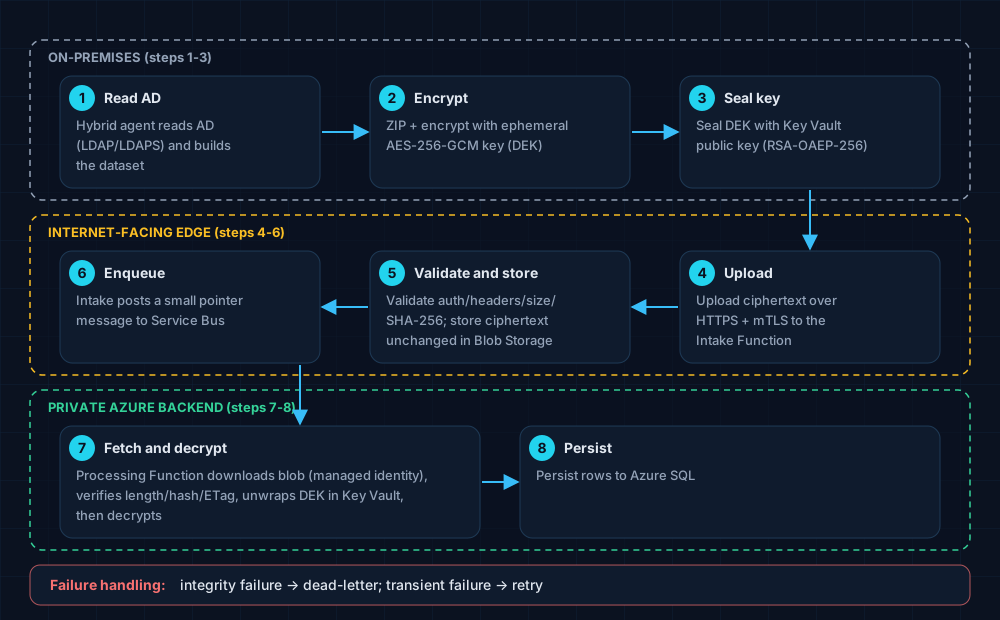
Figure 1. Three zones, eight steps. The data is readable only at the two ends.
In words: the agent reads AD, serialises and zips the dataset, encrypts it with a fresh AES-256-GCM key, and seals that key (the DEK) with a Key Vault public key using RSA-OAEP-256. The ciphertext goes over HTTPS with mutual TLS to the intake function, which stores it untouched in Blob Storage and posts a tiny pointer to Service Bus. A processing function downloads the blob, verifies it, asks Key Vault to unwrap the key, decrypts, and writes to Azure SQL.
Step 1: seal on the client, with only a public key
The agent has a fresh 256-bit key for every artifact, and it never needs a private key or an Azure identity to protect it:
// src\BitLockerKeyMonitor.Core\Security\DekSealingService.cs (lines 53-64)
var replayNonce = new byte[16];
RandomNumberGenerator.Fill(replayNonce);

var dek = new byte[SealedArchiveCodec.DekSize];
try
{
    RandomNumberGenerator.Fill(dek);

    var (container, payloadNonce) = SealedArchiveCodec.Seal(
        payload, dek, effectiveArtifactId, expiresAt, replayNonce);

    var (sealedDek, keyVersionUri) = await _facade.SealDekAsync(dek, ct).ConfigureAwait(false);
The wrapping happens locally. The agent fetches the public half of the key and does the RSA step itself:
// src\BitLockerKeyMonitor.HybridAgent\Security\LocalRsaDekSealingFacade.cs (lines 43-52)
public async Task<(byte[] SealedDek, string KeyVersionUri)> SealDekAsync(byte[] dek, CancellationToken ct)
{
    if (dek is null || dek.Length != 32)
        throw new ArgumentException("DEK must be exactly 32 bytes.", nameof(dek));

    var key = await GetOrRefreshKeyAsync(ct).ConfigureAwait(false);
    using var rsa = RSA.Create();
    rsa.ImportSubjectPublicKeyInfo(key.PublicKeyDer, out _);
    var sealedDek = rsa.Encrypt(dek, RSAEncryptionPadding.OaepSHA256);
    return (sealedDek, key.KeyVersionUri);
}
Note the keyVersionUri returned alongside: the sealed key is pinned to a specific key version, so rotation does not strand in-flight batches.
Step 2: an intake that cannot read the mail
The internet-facing function never deserialises the dataset. It bounds the request, hashes the exact bytes, stores those same bytes, and publishes a pointer:
// src\BitLockerKeyMonitor.Intake.Functions\Triggers\SealedBatchIntakeFunction.cs (lines 75-96)
var maxRequestBytes = int.TryParse(
    Environment.GetEnvironmentVariable("BLKMON__HYBRID_INTAKE_MAX_REQUEST_BYTES"),
    out var configuredLimit)
    ? configuredLimit
    : DefaultMaxRequestBytes;
if (request.ContentLength > maxRequestBytes)
{
    return new ObjectResult($"Request exceeds the {maxRequestBytes}-byte intake limit.")
    {
        StatusCode = StatusCodes.Status413PayloadTooLarge,
    };
}

byte[] body;
try
{
    body = await ReadBoundedAsync(request.Body, maxRequestBytes, ct).ConfigureAwait(false);
}
catch (InvalidDataException ex)
{
    return new ObjectResult(ex.Message) { StatusCode = StatusCodes.Status413PayloadTooLarge };
}
// same file (lines 98-107)
// Hash the EXACT bytes about to be stored — this is the container hash the Azure
// processing worker will re-verify before ever attempting to decrypt.
var actualHash = Convert.ToHexString(SHA256.HashData(body));
if (!string.Equals(actualHash, expectedHash, StringComparison.OrdinalIgnoreCase))
{
    return new BadRequestObjectResult("X-BlkMon-Content-Sha256 does not match the request body.");
}

var blobName = SealedArtifactBlobLayout.BuildBlobName(sessionId, artifactId);
var etag = await _blobStore.StoreAsync(blobName, body, actualHash, ct).ConfigureAwait(false);
The intake limit is 24 MiB, and the queue only ever carries metadata (blob name, hash, length, ETag, key version). Even a fully compromised intake can only hold ciphertext it has no way to open.
Step 3: verify first, decrypt second
On the processing side, integrity is checked before any cryptography happens:
// src\BitLockerKeyMonitor.Functions\Triggers\SealedBatchConsumerFunction.cs (lines 111-145)
byte[] container;
try
{
    // Verify-before-decrypt: length, SHA-256, and ETag are all checked inside
    // DownloadVerifiedAsync BEFORE it returns — a corrupted or substituted blob never
    // reaches SealedBatchHandler.
    container = await _blobStore.DownloadVerifiedAsync(
        reference.BlobName,
        reference.ContentSha256,
        reference.ContentLength,
        reference.ETag,
        cancellationToken).ConfigureAwait(false);
}
catch (InvalidDataException ex)
{
    _logger.LogError(
        ex,
        "Sealed artifact {ArtifactId} failed integrity verification (blob={BlobName}); dead-lettering",
        reference.ArtifactId,
        reference.BlobName);
    await actions.DeadLetterMessageAsync(
        message,
        deadLetterReason: "IntegrityFailure",
        deadLetterErrorDescription: ex.Message,
        cancellationToken: cancellationToken).ConfigureAwait(false);
    return;
}
The error policy is the interesting part. Integrity failures are permanent: retrying a tampered blob a hundred times will not make it honest, so it goes to the dead-letter queue. Anything unexpected is abandoned for redelivery:
// same file (lines 256-263)
catch (Exception ex)
{
    _logger.LogError(
        ex,
        "Unhandled exception processing sealed artifact {ArtifactId} (messageId={MessageId}); abandoning for redelivery",
        artifactId, message.MessageId);
    await actions.AbandonMessageAsync(message, cancellationToken: cancellationToken).ConfigureAwait(false);
}
Fail closed, but do not lose data you can still use. Idempotency is handled with a recorded-batch table, so a redelivered message is a harmless no-op.
Who is allowed to do what
The cryptography is only half of the story. The other half is Azure RBAC, scoped to the key, not the vault:
// infra\modules\keyvault.bicep (lines 236-255)
resource sealKeyReadRa 'Microsoft.Authorization/roleAssignments@2022-04-01' = [for pid in sealKeyReadPrincipalIds: {
  scope: agentSealKey
  name: guid(agentSealKey.id, pid, kvCryptoUserRoleId, 'read')
  properties: {
    roleDefinitionId: subscriptionResourceId('Microsoft.Authorization/roleDefinitions', kvCryptoUserRoleId)
    principalId: pid
    principalType: 'ServicePrincipal'
  }
}]

resource sealKeyDecryptRa 'Microsoft.Authorization/roleAssignments@2022-04-01' = [for pid in sealKeyDecryptPrincipalIds: {
  scope: agentSealKey
  name: guid(agentSealKey.id, pid, kvCryptoUserRoleId, 'decrypt')
  properties: {
    roleDefinitionId: subscriptionResourceId('Microsoft.Authorization/roleDefinitions', kvCryptoUserRoleId)
    principalId: pid
    principalType: 'ServicePrincipal'
  }
}]
Two lists, two identities: the intake can read the public key so it can serve it to agents, and only the processing identity can unwrap with the private key, which Key Vault never exports.
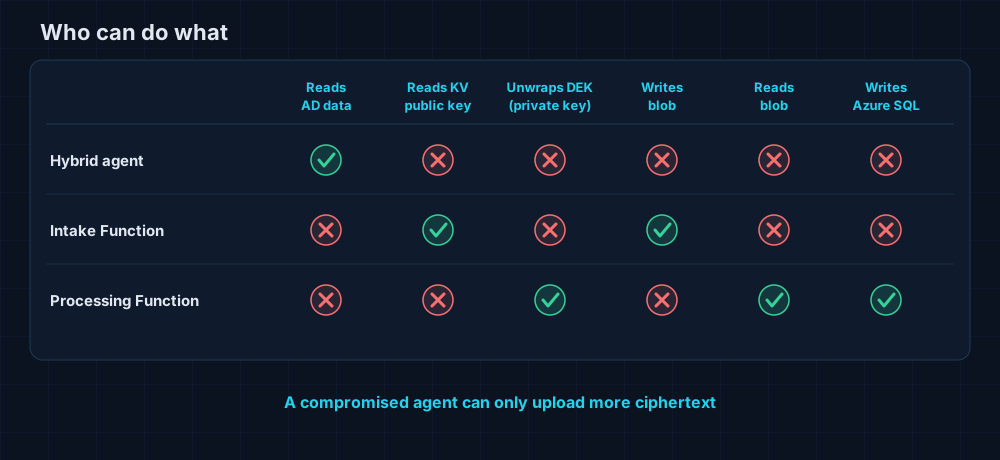
Figure 2. Every identity gets exactly one superpower. A compromised agent can only upload more ciphertext.
Why it holds up
- The agent has HTTPS and mutual TLS, nothing else. No Key Vault, no Storage, no SQL.
- The intake can store bytes and queue pointers, but it cannot decrypt anything.
- The processor is the only component that touches plaintext, and it sits behind private endpoints.
Everything is provisioned with Bicep and uses managed identities instead of stored credentials. Next, in Part 3, we look at what happens to the key once it lands in SQL, and at the limits we would rather admit than hide.