Series · Intune Assignment Viewer: from feature gap to implementation · Part 2 of 2
Microsoft Intune · Microsoft Graph · Blazor Server · .NET 10 · Managed Identity · Application Architecture
Under the hood of Intune Assignment Viewer: Graph, identity, and performance
A technical walkthrough of the Blazor Server architecture, separated sign-in and Graph identities, category-specific Graph collection, caching, batching, throttling controls, and deployment trade-offs.
- Drafted
- Published
- Reading time
- 8 min
- Author
- Roberto Gramellini
Source:
Intune Assignment Viewer
· revision 963b5cc8
- Intune Assignment Viewer architecture
- Microsoft Graph beta
- Managed Identity
- Graph batching
- Graph throttling
- Blazor Server
- Intune application permissions
Under the hood of Intune Assignment Viewer: Graph, identity, and performance
An “all assignments for this group” screen sounds like one query. In practice, Intune assignment data spans multiple Microsoft Graph resources, each with its own catalog, assignment endpoint, metadata, and sometimes special-case behavior.
Intune Assignment Viewer handles this by collecting resource data on the server, mapping it into a common model, and using separate identities for administrator sign-in and Microsoft Graph access. This article follows that design and its operational trade-offs.
A Blazor Server application with two distinct trust paths
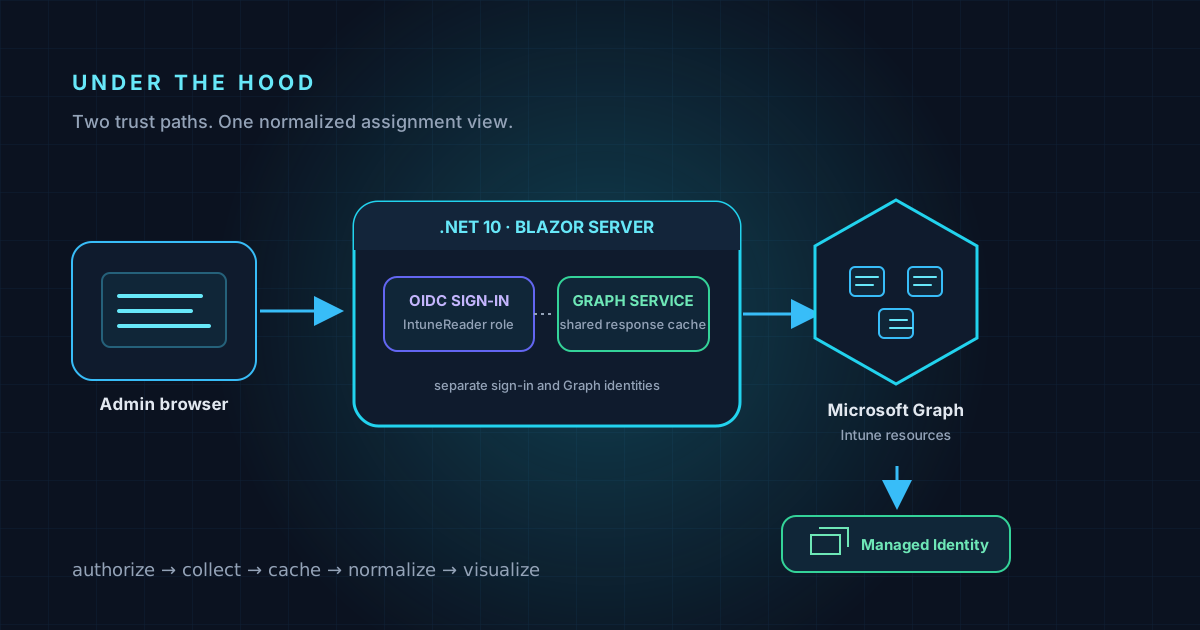
The application uses ASP.NET Core 10 with interactive Blazor Server components. The browser talks to the application over HTTPS; server-side services call Microsoft Graph. It does not ask the browser to hold an application credential for Graph.
There are two separate identity concerns:
- Administrator sign-in and authorization. Microsoft.Identity.Web uses an Entra ID app registration for OpenID Connect sign-in. The portal requires the configured application role—
IntuneReaderby default—before a user can access the assignments page. - Application-to-Graph authentication. In Azure App Service, the application uses Managed Identity. For on-premises hosting, the repository supports a separate Graph app registration using a certificate or, as a less secure fallback, a client secret.
Keeping these responsibilities separate means the sign-in registration does not have to hold the application permissions used for Graph reads. On-premises deployments need to protect the Graph credential at the host; the README recommends certificate-based credentials over a client secret and warns against committing credentials to appsettings.json.
The Graph application must be granted and admin-consented the permissions appropriate to the supported Intune resources. The repository lists permissions such as Group.Read.All, DeviceManagementConfiguration.Read.All, DeviceManagementApps.Read.All, DeviceManagementServiceConfig.Read.All, and DeviceManagementScripts.Read.All. The exact least-privilege set should be reviewed against the deployment’s enabled features and Microsoft’s current permission documentation.
Treat IntuneReader as a privileged, tenant-wide read role. The signed-in user's app role gates access to the portal, but Graph calls are made with the application's Graph identity and its tenant-wide application permissions—not with that user's delegated Graph permissions. A user granted IntuneReader can therefore inspect the group and assignment data available to the configured Graph identity. Keep the role assigned to a deliberately small, approved group, review membership regularly, and treat the Graph permissions and returned data as high-value.
Collecting heterogeneous resources
The assignment service starts work for the requested policy families concurrently and adds each normalized result to a thread-safe ConcurrentBag<IntuneAssignment>. This matters because the category tasks run in parallel; a regular List<T> would not be safe for concurrent writes.
Most categories follow the same broad pattern:
- Enumerate the relevant catalog, following Graph pagination.
- Retrieve assignment collections for those resources.
- Resolve group targets and assignment intent.
- Map resource-specific fields into the shared assignment model.
- Sort the final result for display.
The repository uses the Microsoft Graph SDK for group search and a dedicated GraphBeta HTTP client for raw beta endpoint calls. The service covers multiple resources including device configurations, Settings Catalog, administrative templates, compliance policies, mobile apps, app configurations, endpoint security intents, scripts, Autopilot profiles, enrollment configurations, and Cloud PC resources.
Not all resource families have identical shapes. App Protection policies, for example, require looking at @odata.type to choose a resource-specific assignments path. Endpoint security also needs to account for both Settings Catalog configurations and template-style intents. These differences explain why a unified screen still needs explicit category-specific collection and mapping logic behind it.
Code excerpt: batch work without corrupting concurrent results
The service starts category collectors concurrently. Since each collector adds to the shared result, the repository uses ConcurrentBag<IntuneAssignment> rather than a regular List<T>, then waits for the collectors before sorting the completed result. This abbreviated excerpt is from GetAssignmentsForGroupAsync in IntuneService.cs:
var assignments = new System.Collections.Concurrent.ConcurrentBag<IntuneAssignment>();
var tasks = new List<Task>();

if (filterType is null or PolicyType.Configuration)
{
    tasks.Add(GetDeviceConfigurationsAsync(groupId, assignments));
    tasks.Add(GetSettingsCatalogAsync(groupId, assignments));
}

if (filterType is null or PolicyType.Compliance)
    tasks.Add(GetCompliancePoliciesAsync(groupId, assignments));

if (filterType is null or PolicyType.Application)
    tasks.Add(GetMobileAppsAsync(groupId, assignments));

await Task.WhenAll(tasks);

return assignments
    .OrderBy(a => a.PolicyType)
    .ThenBy(a => a.PolicyName)
    .ToList();
The production method schedules the other requested categories in the same way and logs collection errors; the excerpt is shortened to show the concurrency pattern. The important invariant is that the result collection is safe for parallel Add calls.
Keeping a many-endpoint view responsive
Without caching, one group selection can trigger a large set of catalog and assignment requests. The repository adds several controls:
- Tenant-wide in-memory response cache. A singleton
GraphResponseCacheshares results across user circuits. Catalogs, assignments, and group names use configurable time-to-live values. - Per-URL request coalescing. Concurrent requests for the same URL wait on one lock, so overlapping users do not all fetch an identical uncached response at once.
- Concurrency limiting and retries. A semaphore caps in-flight Graph calls; the service retries transient throttling responses and respects
Retry-After. - Negative caching. Responses that represent missing or forbidden resources are cached briefly to avoid repeatedly hitting endpoints that return 404 or 403.
- Bounded memory. A dedicated memory cache applies a configurable size limit rather than allowing Graph response data to grow without limit.
- Optional warmup and Graph batching. When enabled, a hosted service pre-fetches catalogs and assignment collections. Graph
$batchcan combine up to 20 GET operations, reducing the number of HTTP round trips during warmup. - Explicit refresh. The UI can bypass cached assignment data when an administrator needs a fresh collection.
These measures trade some freshness for fewer repeated calls and a more responsive view. The cache lifetime and warmup behavior are configurable; operators should tune them for tenant size, Graph throttling, hosting memory, and the freshness their workflow requires. Warmup is off by default for on-premises deployments.
Code excerpt: respect Graph throttling
The cache wrapper retries throttling and temporary service-unavailable responses. It prefers Graph's Retry-After value, with an exponential delay as a fallback, instead of immediately retrying in a tight loop. This abbreviated excerpt is from FetchWithRetryAsync in GraphResponseCache.cs:
if (response.StatusCode == System.Net.HttpStatusCode.TooManyRequests ||
    (int)response.StatusCode == 503)
{
    if (attempt < maxAttempts)
    {
        retryDelay = response.Headers.RetryAfter?.Delta
            ?? TimeSpan.FromSeconds(Math.Pow(2, attempt));
        _logger.LogInformation(
            "Throttled ({Status}), retry in {Delay}s: {Url}",
            (int)response.StatusCode,
            retryDelay.Value.TotalSeconds,
            url);
    }
}
The retry is bounded by maxAttempts; other non-success responses follow separate handling paths. Backoff helps avoid amplifying transient throttling, but it does not remove Graph service limits or guarantee that every request will succeed.
Deployment choices change the credential model
The same codebase supports Azure App Service and on-premises IIS:
- Azure: use a system-assigned Managed Identity for Graph and grant it the required application permissions. This avoids a long-lived Graph client secret in application configuration.
- On-premises: there is no Managed Identity. Use a dedicated Graph app registration with a certificate where possible; the repository supports loading a certificate from the Windows certificate store, a PFX file, or base64 configuration. A client secret is also supported but is explicitly the less secure option.
For on-premises hosting, prefer a certificate in the Windows certificate store with private-key access restricted to the application-pool identity; make the key non-exportable where the certificate provider supports it. A PFX file or base64 certificate is still sensitive credential material: keep it out of source control and appsettings.json, restrict access to its storage and configuration, and plan certificate renewal and rotation. The sign-in app registration and Graph app registration serve different purposes. The repository allows a combined registration for labs or small deployments, but recommends separate registrations for production to reduce the impact if one credential is exposed.
Boundaries and things to verify
This portal aggregates assignment information; it does not prove that each device has received, evaluated, or applied those assignments. The assignment view is group-centric and does not currently implement the reverse lookup or transitive-group analysis identified in the repository roadmap.
The project calls Microsoft Graph beta endpoints for parts of its Intune coverage. Beta APIs can change and should be treated accordingly: validate behavior against current Microsoft documentation, test upgrades, and monitor Graph errors. A 403 can also mean that a permission is missing or that a feature is unavailable in the tenant; the viewer should not be treated as a substitute for permission review.
Before a production rollout, validate the narrowly scoped app role assignments, Graph application permissions and admin consent, credential storage, TLS and redirect URIs, cache settings, and the policy categories relevant to the tenant. Start with a small, approved group of operators who are authorized for tenant-wide Intune assignment visibility, then compare representative results with the Intune admin center.
The source, screenshots, configuration reference, and deployment guides are in the IntuneAssignmentViewer repository. The repository is MIT-licensed and credits the IntuneAssignmentChecker PowerShell module as inspiration for Graph endpoint coverage.