Series · NimbusLedger: from inventory evidence to controlled operations · Part 2 of 3
Microsoft Intune · Microsoft Entra ID · Configuration Manager · Automation safety · Device lifecycle
NimbusLedger, part 2: planning safer device cleanup
What NimbusLedger checks before deleting device records, how dry-run and budgets work, and why failed operations can still need investigation.
- Drafted
- Published
- Updated
- Reading time
- 8 min
- Author
- Roberto Gramellini
Source:
NimbusLedger
· revision 88452d72
- NimbusLedger cleanup
- dry run
- device deletion allowlist
- LDAP FILETIME zero
- cleanup preflight
- uncertain deletion outcome
NimbusLedger, part 2: planning safer device cleanup
A Windows device has not contacted Intune for months. Its Entra registration is old too, and ConfigMgr calls the resource obsolete. A tempting bit of housekeeping, until you ask whether the laptop was renamed, whether a collector lost permissions, or whether that impressive age came from an unset timestamp.
Sending an HTTP DELETE is straightforward. I'd spend the effort on the decision that comes before it.
Part 1 established NimbusLedger's identity and collection model. This article follows its cleanup boundaries at version 2.0.3, revision 88452d72893afc1d0ccdd0a20cab05d518ffc684. These safeguards are implemented, but they are not a substitute for a real pilot or an organizational decommissioning approval.
What qualifies for cloud cleanup?
The cloud planner does not turn the dashboard's missing lists into deletion requests.
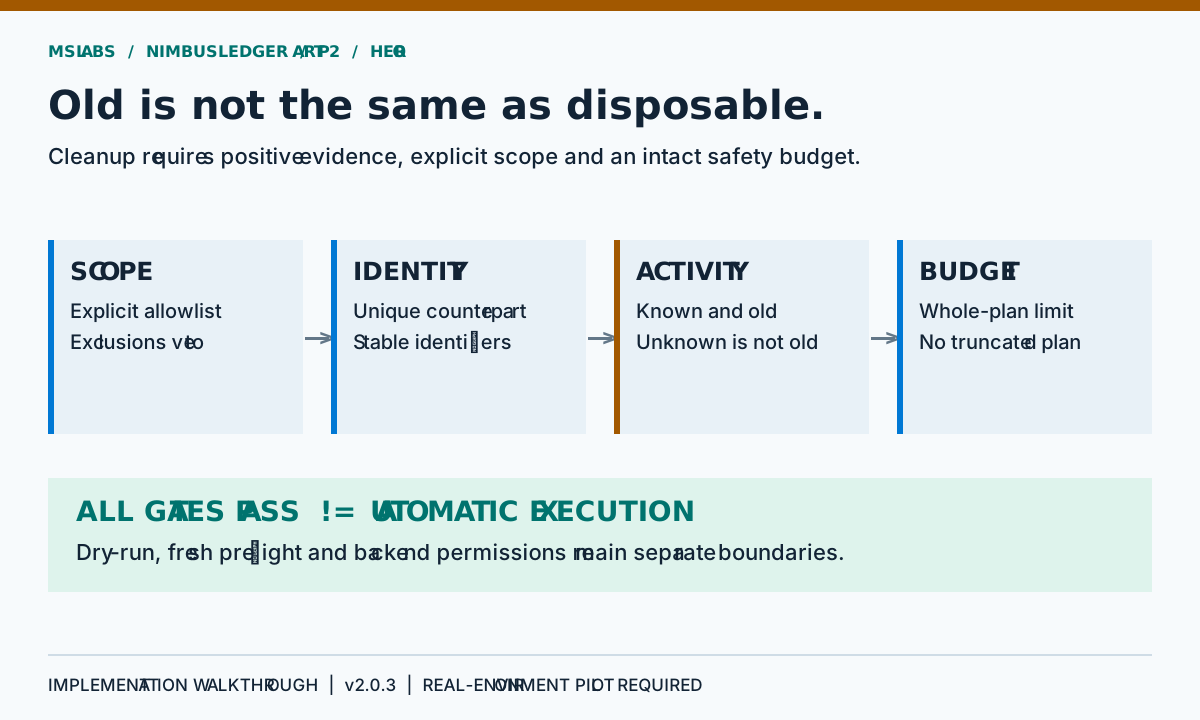
It requires an explicitly allowlisted Azure device identifier, a Windows Entra record with hybrid ServerAd trust, a unique stable AD counterpart, and exactly one associated Intune record. AD activity and change timestamps, Entra sign-in and Intune sync must all be known and old enough.
An old name match will not do. Neither will a missing AD object: the current implementation refuses to treat absence in AD as an approved retirement. If that is your required scenario, it needs a separate lifecycle or tombstone process before it can be supported safely.
Exclusions can veto candidates by identifier or normalized name. They do not authorize any extra candidate. Also be precise about what the allowlist provides: it is configuration, not signed human approval for each run or an integration with external change management.
Disabled, previewed and executed are different states
The cloud option defaults leave cleanup disabled, dry-run enabled, both deletion selections disabled and the device allowlist empty.
Even a preview takes deliberate setup. Enable cloud cleanup, choose the source objects that may be removed, populate a scope and satisfy the planner. Keep dry-run enabled and the intended actions are logged without deletion calls.
ConfigMgr has additional options: inventory enablement, cleanup enablement, a resource-ID allowlist and its own dry-run flag. Actual ConfigMgr deletion requires both the global and ConfigMgr dry-run flags to be false.
For the initial read-only deployment, do not grant destructive backend permissions. I prefer a default backed up by an identity that cannot delete: that gives a configuration mistake another obstacle.
Reject untrustworthy input before examining candidates
Before constructing a cloud action list, the planner checks inventory completeness, nondefault collection start time, consistent timestamp ordering, absence of future capture time, maximum snapshot age and maximum collection duration.
It also checks minimum AD, Entra and Intune population sizes, explicit allowlist presence and reported identity ambiguity. A blocker prevents the execution service from acting on that plan.
Those minimum counts default to one per core source. In an environment expecting thousands of devices, one is hardly a reassuring baseline. Configure meaningful lower bounds yourself; the planner does not statistically learn what an unexpectedly small inventory looks like.
Check the two clocks separately. A new snapshot can report activity from months ago, and an old snapshot can report activity that was recent when collected. Cleanup requires acceptable inventory freshness and sufficiently old device evidence.
The year 1601 is not a last successful logon
LDAP lastLogonTimestamp uses Windows FILETIME. Zero means no recorded logon, but convert it mechanically and you get a date in 1601. A simple “older than threshold” test will accept that date with great confidence. The confidence is the problem.
The LDAP mapper instead maps nonpositive FILETIME values to unknown activity. The shared activity predicate adds a second boundary: a usable old timestamp must be later than the Unix epoch and earlier than the applicable cutoff.
So legacy 1601 values, minimum date sentinels and the epoch itself are rejected even if they arrive in a constructed or previously serialized record. This catches nonsense dates. It cannot establish that the activity field itself is authoritative.
Original explanatory pseudocode, not copied source or a runnable configuration:
if activity is absent or a sentinel date:
    do not qualify the device
if activity is at or after the inactivity cutoff:
    do not qualify the device
continue only with known historical evidence
“Unknown” does not mean “ancient.” An endpoint does not become safe to delete because its timestamp predates electricity.
Whole-plan budgets prevent a convenient partial success
The cloud count budget applies to actions, whereas its percentage budget uses distinct candidate device identifiers against scoped Entra inventory. Deleting both the Intune and Entra objects for one device can consume two actions.
For a generic numerical example, suppose an allowlist corresponds to 40 Entra records and two devices qualify for both deletions. The plan contains four actions but affects two device identifiers: 5% of that scoped population. A third such device would raise the proportion to 7.5%, exceeding a 5% limit.
If a plan exceeds the budget, the whole plan is rejected. Taking the first few entries would merely let collection order decide what gets deleted, which is no approval mechanism.
Pay attention to the denominator: configured scope, rather than the whole tenant. A one-device pilot proposing one deletion therefore affects 100% of its scope. Review any pilot adjustment explicitly. Do not weaken global settings just to get rid of an inconvenient warning.
Preflight asks whether the plan still holds
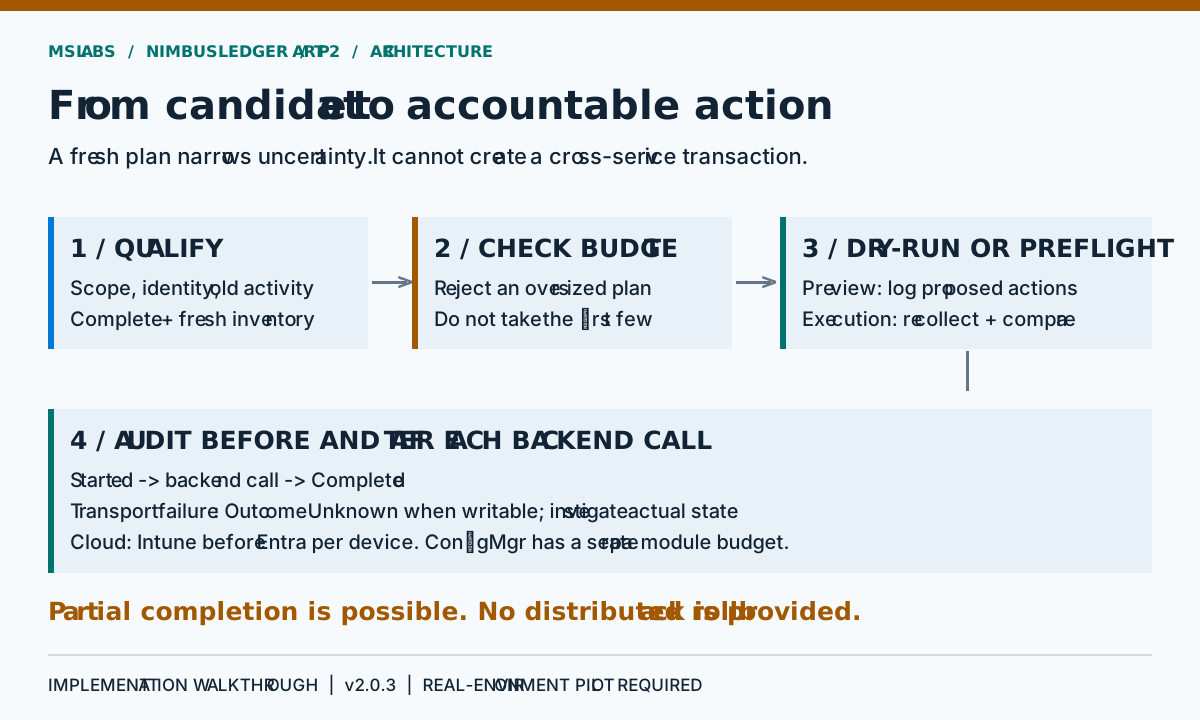
For actual cloud execution, CleanupService recollects AD, Entra and Intune. It builds another plan and compares the complete action sets. New blockers or changed actions abort execution before that module issues its first deletion.
ConfigMgr's cleanup service performs a fresh ledger reconciliation and compares the candidate resource records before real execution.
Fresh preflight shortens the time between observation and action, but sources can still change afterwards. There is no shared conditional transaction across these backends, and the configured allowlist cannot lock them.
Within each cloud device's actions, Intune deletion is added before Entra deletion. These calls remove service records; the implementation does not issue a remote wipe or prove that the physical endpoint was destroyed. Never use record cleanup as a substitute for a device-disposal workflow.
ConfigMgr adds evidence, not an obsolete-flag shortcut
A ConfigMgr candidate requires an allowlisted resource ID and a discovered AD object GUID. Its AD, Entra and Intune counterparts must meet their own identity and activity checks.
Only then does ConfigMgr activity enter the decision. A non-obsolete record needs inactive client status and sufficiently old last activity. An obsolete record uses the separate obsolete threshold, also against last activity.
Be careful reading that threshold. It does not tell you how long the obsolete flag has been set; the inventory has no such lifecycle history. The defaults are 90 days for inactive records and seven days for obsolete ones. Those are configurable conditions for this source, not advice to retire devices after seven days.
The deletion targets a ConfigMgr SMS_R_System resource by its resource ID. ConfigMgr has its own count budget and uses the global percentage setting against scoped ConfigMgr inventory. Cloud and ConfigMgr budgets are separate; they do not form a global, cross-host daily allowance.
Durable audit is not a distributed rollback
Before a destructive call, the execution service writes Started through the file audit implementation, which flushes the JSONL entry to disk. If that initial write fails, the backend call is not made.
Successful calls are followed by Completed; the ConfigMgr client can also produce NotFound. Selected transport, API and cancellation failures trigger a best-effort OutcomeUnknown record and stop execution by rethrowing.
An uncertain outcome needs investigation, not a guess. The server may receive a request whose response never reaches the worker. A crash or failed final audit write can also leave only Started. Check backend state before deciding it failed. Nor can every failure be relied on to append its own explanation.
If a later operation fails, earlier successful operations stay done. The local journal cannot roll them back, coordinate a transaction or provide cryptographic immutability.
A useful destructive pilot is small and deliberately awkward
I'd start with a preview-only scope and independently checked identities, then deliberately give the planner bad news: unknown timestamps, duplicate identities, exclusions, a too-small population and a plan just above budget. None of these cases should generate executable work.
An expendable device record comes next, only under an approved operational procedure and with restricted delete permissions. Test a changed preflight and a backend failure after an earlier successful action; work out what audit evidence recovery needs. Valuable production records are not suitable props for a simulated network failure.
Part 3 turns to storage, access and deployment. Inspect the pinned implementation to decide which safeguards fit your environment and which lifecycle controls still belong outside this project.
Source and reuse boundary
The explanations, generic examples, pseudocode and artwork are original. NimbusLedger declares no repository-level license at the cited revision. No source excerpts are reproduced, and public repository access does not imply permission to redistribute the implementation. Clarify reuse terms with its owner.