Series · NimbusLedger: from inventory evidence to controlled operations · Part 3 of 3
.NET · Windows Service · Windows Authentication · Observability · Operational readiness
NimbusLedger, part 3: running the worker and dashboard
Set up NimbusLedger's worker, snapshot storage and dashboard access, then check freshness, audit retention and recovery in a staged pilot.
- Drafted
- Published
- Updated
- Reading time
- 9 min
- Author
- Roberto Gramellini
Source:
NimbusLedger
· revision 88452d72
- NimbusLedger deployment
- atomic JSON snapshots
- Negotiate authentication
- Windows group authorization
- health readiness
- read-only pilot
NimbusLedger, part 3: running the worker and dashboard
The dashboard loads. Good: the web process can serve a page. Before calling the deployment healthy, though, I'd check whether directory collection succeeded, whether the inventory is fresh and who else can read it. A green page is an optimistic colleague.
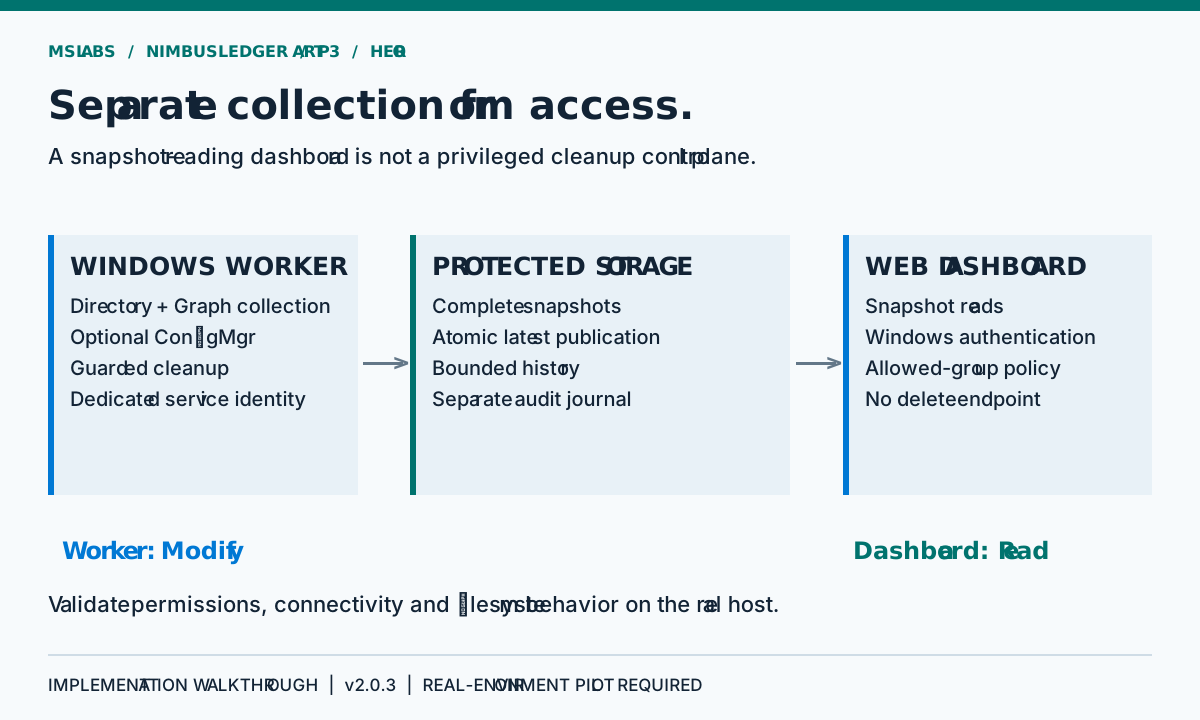
NimbusLedger puts the privileged work in one process and snapshot reading in another. Filesystem permissions, service identity, authentication and health checks have to keep that separation intact when you deploy it.
This final part examines version 2.0.3, pinned to 88452d72893afc1d0ccdd0a20cab05d518ffc684. Part 1 covered reconciliation; part 2 covered deletion safeguards. Here the question is what an operator must validate before trusting either.
Two processes, different responsibilities
The worker collects inventories, creates the ledger, persists snapshots and invokes enabled cleanup modules. The web host reads snapshots and serves a Razor dashboard plus /api/snapshot.
You will not find a dashboard delete endpoint in this implementation. A browser session used to read the ledger has no Graph cleanup credential attached to it. Cleanup depends on worker configuration and backend permissions.
Start with the intended topology: a domain-connected Windows worker and an IIS or Kestrel dashboard. Give both the same absolute snapshot directory, with Modify access for the worker and Read access for the dashboard. Granting the web identity write permission may clear a shared-folder error, but it breaks the intended access model.
There is no Azure deployment configuration in the repository. Publishing to a web app does not supply LDAPS connectivity, a Windows service identity, Kerberos or trustworthy shared storage. Choose the host around those requirements; choosing the deployment button first leaves a lot of work afterwards.
Publish a complete file, not a file being rewritten
The web process can read at exactly the moment the worker publishes. Overwrite the live JSON directly and a reader may catch a truncated document, or a valid prefix whose serialization has not finished.
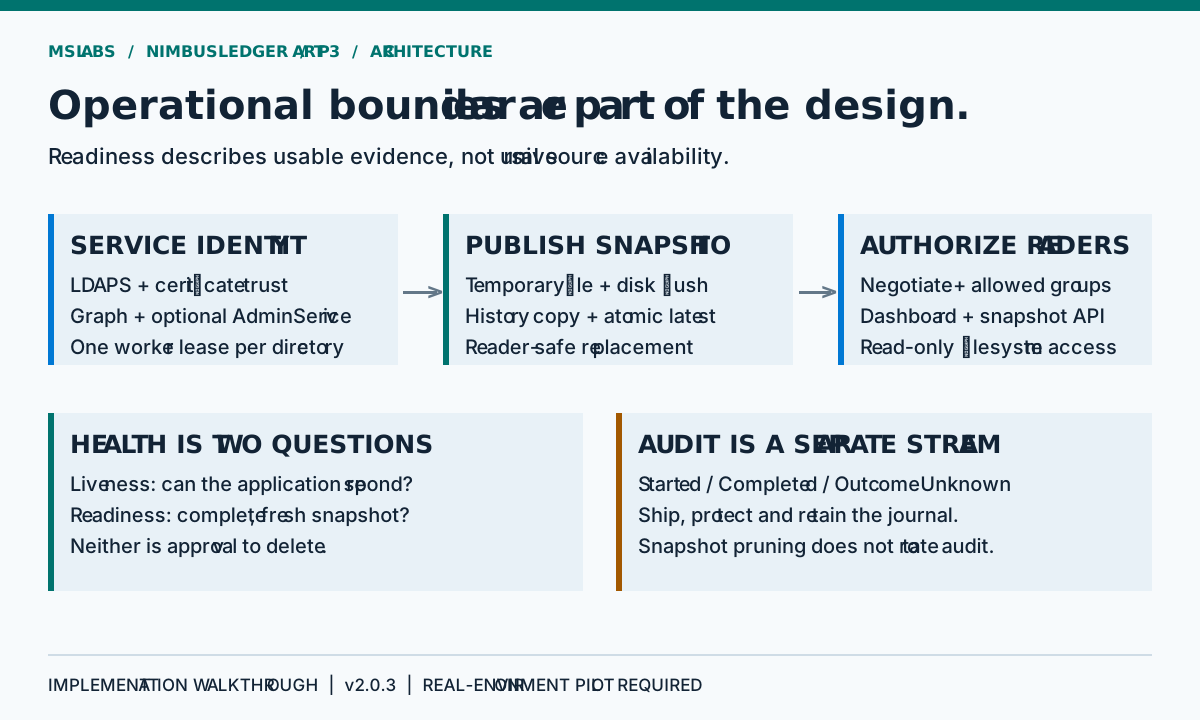
The snapshot store instead serializes to a unique temporary file in the snapshot directory, flushes it to disk, copies a uniquely named history file, and publishes the latest path using replacement or an initial move.
Original explanatory pseudocode, not a source excerpt:
finish and flush a new snapshot beside the live file
retain a uniquely named history copy
publish the completed file through an atomic filesystem operation
prune older snapshot history
This depends on the storage supporting the expected replacement semantics for old and new files. A successful JSON write is only the first check. It tells you little about concurrent readers during replacement.
Windows readers use delete-sharing permission so replacement can occur while an older handle remains open. The store retries selected transient Windows sharing and replacement errors with bounded delays. Readers also tolerate brief replacement transitions; persistent access and I/O failures do not become an invented healthy snapshot.
The atomic operation publishes the latest file. History, latest, directory metadata and backend cleanup do not become one transaction because of it. A history copy can exist after publication fails. Disk flush helps too, without guaranteeing every storage-controller or power-loss outcome.
The worker lease has a scope
At startup the worker opens .worker.lock for the process lifetime with sharing settings that prevent another read/write worker lease on the same storage from succeeding.
Unlike an in-memory semaphore, that lease can coordinate separate processes using the same storage. Its reach ends there. It does not elect a leader across distributed hosts.
Two workers with independent directories can both acquire a lease and both consume their configured cleanup budgets. Check network-storage locking explicitly as well; it can behave differently from local disk. Do not count on a local lock file to enforce a global device-lifecycle policy.
The worker has Windows Service lifetime integration, a configurable startup delay and repeated reconciliation. Failures inside a cycle are logged; a later scheduled cycle can try again. A failure does not guarantee that earlier cleanup operations in the same cycle did not complete.
Authentication is not authorization
The web host registers Windows Negotiate authentication. It also requires a nonempty WebAccess:AllowedGroups configuration and builds a fallback policy requiring an authenticated user in an allowed Windows group.
Signing in is only half the check. Windows authentication establishes who the caller is; allowed-group membership determines whether they can read the ledger. An empty allowed-group list fails startup validation. It does not mean everyone gets access.
The policy protects the dashboard and snapshot API, while health endpoints explicitly allow anonymous access at the application layer. There is no anonymous-development bypass for inventory data.
IIS can complicate health probes: server-level authentication may challenge the request before application endpoint metadata is evaluated. With anonymous access disabled globally, use an authenticated probe or deliberately configure a health path, even though the application route itself allows anonymous access.
Kestrel and Negotiate introduce another operational dependency: Kerberos/SPNs and proxy connection handling must be correct. Do not place a generic identity header in front of the app and assume it is equivalent to Windows authentication. HTTPS protects transport; it does not decide group membership.
Liveness answers a smaller question than readiness
The two health routes intentionally answer different questions:
| Route | Meaning | What it does not establish |
|---|---|---|
/health/live |
The application can respond | Fresh inventory or source connectivity |
/health/ready |
A complete, acceptably fresh snapshot is readable | Current connectivity to every source or approval for deletion |
The readiness check validates completeness, collection/capture ordering and age, and rejects unreadable or malformed snapshot storage. It evaluates age from collection start, not just the time serialization finished.
Do not expect readiness to call Graph or LDAP. A source can fail just after collection and readiness will remain healthy until the last good snapshot ages out. I'd watch worker errors and source counts alongside HTTP status.
Health responses contain no inventory records. The snapshot API does. Its authorization and storage permissions deserve at least as much attention as the colour of a health badge.
Keep backend authority with the worker
The infrastructure registration requires LDAPS with certificate validation and validates key cleanup and storage limits at startup.
For Graph, choose explicitly configured application credentials or the Azure Identity default credential chain. The latter depends on the environment. Success in a developer's interactive session tells you nothing conclusive about the Windows Service account, and managed identity needs a host that actually provides it.
Choose the intended app-only identity deliberately, then verify its permissions as that identity. Keep secrets in an approved secret provider or secured deployment configuration, never source control. Set service-account environment values persistently: an administrator's terminal variable does not automatically become a Windows Service variable.
Publish outputs can contain application settings. Review artifacts before transferring them, and never package a developer's real settings as a generic sample. The article's architecture needs no real tenant IDs, device GUIDs, hostnames or screenshots from an organization.
Audit has a retention and recovery cost
The worker's journal is separate from snapshot history. The audit writer appends JSONL records to cleanup-audit.jsonl and flushes them.
Snapshot retention leaves the journal alone. Someone must own its capacity monitoring, access protection, retention and shipment to central logging. A full disk can stop an audit-start write and therefore a deletion. It can also break collection and leave you with less evidence about what happened next.
The journal is not signed or immutable. Its object identifiers are operationally sensitive even though they are useful for investigation. Apply access controls and approved retention rather than exposing it as a troubleshooting download for every dashboard reader.
Local correctness is one acceptance layer
The regression suite covers identity ambiguity, cleanup guards, source failures, snapshot concurrency and web access using controlled fixtures. The CI workflow builds and exercises the solution on Windows and Linux and checks dependency advisories.
Passing CI on two platforms does not make the whole deployment topology cross-platform. Test real AD integration, Windows Service operation and Windows group resolution in the intended Windows environment. Fake inventories are excellent for avoiding live directories during tests, but they cannot prove those integrations work.
A staged pilot with an explicit exit decision
For the first deployment, leave cleanup disabled and grant backend read permissions only. Check identity resolution, expected inventory scope, one-worker locking and snapshot history. Try the dashboard as an authorized reader, an unauthorized user and an anonymous caller.
In a controlled environment, interrupt collection and storage. Incomplete new data must not be published; old snapshots should become visibly stale and eventually fail readiness. Check service recovery and the actual filesystem behavior with concurrent readers.
Once those checks hold, preview cleanup in a narrow, reviewed scope and keep dry-run enabled. Compare budgets, unknown timestamps, duplicate identities and exclusions with source records observed independently.
Only after those stages should an approved destructive pilot grant the necessary delete authority. Plan for partial completion, uncertain backend outcomes and restoration procedures. Removing a service record is not a reversible database transaction across all four systems.
Use the deployment guide at this revision as the implementation's operating checklist, alongside the source snapshot. Production acceptance still needs an explicit decision based on the actual environment. A release label cannot make that decision for you.
Source and reuse boundary
The explanations, pseudocode, scenarios and artwork are original. No repository-level license is declared for NimbusLedger at revision 88452d72893afc1d0ccdd0a20cab05d518ffc684. This article reproduces no source excerpts and grants no right to redistribute the implementation. Establish reuse terms with the repository owner.