Series · LogCollector: authenticated telemetry for Intune devices · Part 2 of 3
Intune · PowerShell · Win32 apps · Resilience
Telemetry for laptops that wander: an offline-first spool and Intune packaging
Part 2 of 3. Why replacing the HTTP Data Collector API (retired in September 2026) requires a resilient device client, and how offline spooling, re-signed retries and matching Intune packages keep collection reliable.
- Drafted
- Published
- Updated
- Reading time
- 7 min
- Author
- Roberto Gramellini
Source:
LogCollector
· revision 680d7bdf
- offline-first
- spool
- retry
- PowerShell
- Intune Win32 app
- IntuneWin
- detection script
- scheduled task
- quarantine
- Pester
In Part 1 we explained why LogCollector exists: the HTTP Data Collector API that many Intune scripts used to push data into Log Analytics was retired in September 2026, and its shared workspace key was always a weak foundation. The backend now distrusts everyone and accepts only certificate-signed requests. That leaves the other half of the problem: the device.
Replacing the old API is not only a cloud exercise. The legacy scripts were fire-and-forget: if the POST failed, the data was gone. Moving to an authenticated, per-request-signed pipeline makes failures more visible (expired timestamps, rejected payloads, unreachable endpoints), so the client has to be smarter about delivery than a ten-line script ever was. This article covers that client: how it keeps data safe until it can be delivered, and how we roll it out to a fleet through Intune.
Laptops are the hard case: they are offline on trains, asleep in bags and abroad on hotel Wi-Fi that blocks everything but port 80. A telemetry platform that drops data whenever the network blinks is not a platform, it is a coin toss.
So the client is built offline-first: collection and delivery are separate, and a durable local spool sits in between.
The life of a telemetry entry
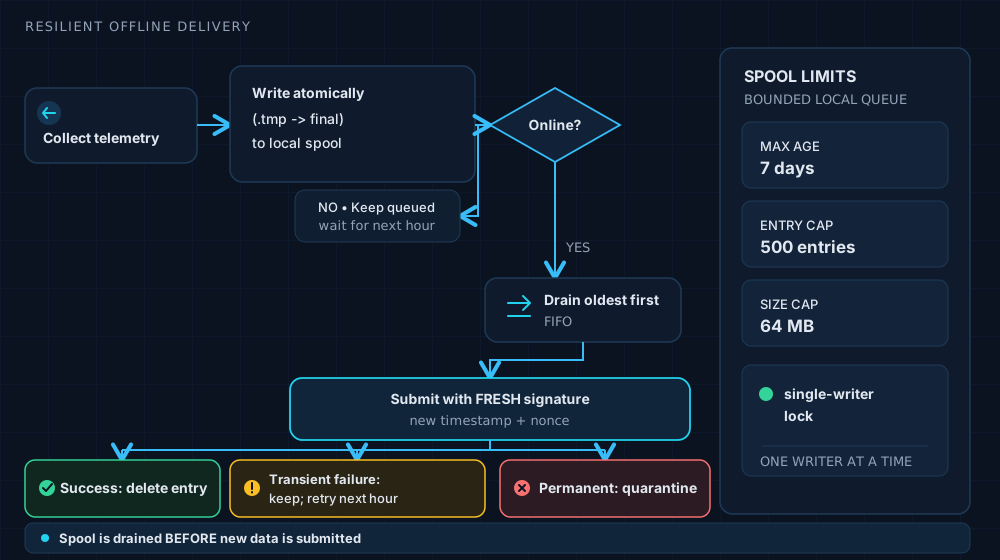
Figure 1. Collect, spool, drain. Success deletes, transient failures wait, permanent failures are quarantined.
Every entry is written atomically: to a .tmp name first, renamed to its final name only when complete, so a power cut can never leave a half-written entry that looks valid.
# Artifacts/MSLabs/1.15.2/2-Intune/CoreSource/Modules/InventorySpool.psm1 (lines 311-315)
$fileName = '{0}-{1}.json' -f $createdUtc.ToString('yyyyMMddTHHmmssfff'), ([guid]::NewGuid().ToString('N'))
$finalPath = Join-Path $SpoolDirectory $fileName
$tempPath = "$finalPath.tmp"

$json = $entry | ConvertTo-Json -Depth 8 -Compress
The timestamp prefix is not decoration: it makes lexical order equal chronological order, which is what "oldest first" needs.
Bounded patience
A spool without limits is a slow disk-filling incident. The defaults are explicit:
# Artifacts/MSLabs/1.15.2/2-Intune/CoreSource/Modules/InventoryClient.psm1 (lines 480-490)
[Parameter(Mandatory)] [string] $SpoolDirectory,
[int] $MaxEntriesPerRun = 50,
[int] $MaxAttemptsPerEntry = 2,
[int] $MaxSpoolAgeDays = 7,
[int] $MaxSpoolEntries = 500,
[int] $MaxSpoolTotalBytes = 67108864,
[int] $MaxDeliveryAttempts = 10,
[ValidateRange(1, 300)] [int] $TimeoutSeconds = 100,
[ValidateRange(1, 900)] [int] $MaxDelaySeconds = 300,
[switch] $NoSleep,
Seven days, 500 entries, 64 MB. Whichever limit is hit first wins, and a hard cap means telemetry from a device that has been dark for a month degrades gracefully instead of filling C:.
The drain order is a deliberate decision too, documented right in the function:
# same file (lines 462-469)
<#
.SYNOPSIS
    Delivers previously spooled envelopes, oldest first.
.DESCRIPTION
    Runs BEFORE the current sample is submitted, so the backlog is the thing
    that gets the freshest connectivity rather than being starved behind new
    data. Draining stops at the first transient or auth failure: if the
    service is down, continuing would waste the run's time budget and add
    load to an already unhealthy endpoint.
#>
Stopping at the first transient failure is the part people forget. If the service is down, hammering it fifty times just makes the next outage worse.
Permanent failures get a quarantine, not a retry loop
If the service says "no" in a way that will never change (a rejected payload, say), retrying is pointless and leaving the entry at the head of the queue would block everything behind it. It moves to quarantine, where an operator can inspect it:
# same file (lines 558-564)
'Permanent' {
    $null = Move-SpoolEntryToQuarantine -Path $entry.Path -Reason ("http-{0}" -f $result.StatusCode)
    $summary.Quarantined++
    Write-InventoryTransportDiagnostic $DiagnosticSink 'SpoolQuarantined' @{
        SpoolPath = $entry.Path; Stage = 'PermanentRejection'; StatusCode = $result.StatusCode
    }
    continue
}
The retry that bit us: signatures expire on purpose
Here is the subtlety that cost us an afternoon. Part 1's gates reject stale timestamps and repeated nonces. A spooled entry that waits four days and is then sent with its original signature fails twice over. The fix is a rule, not a patch: never store a signature, always re-sign at delivery time.
# src/Client/RequestSigning.psm1 (lines 73-78)
.SYNOPSIS
    Produces the body bytes and headers for a signed submission.
.DESCRIPTION
    A fresh timestamp and nonce are generated on every call. That is required,
    not incidental: a retry (or a spool drain hours later) must re-sign, since
    the server rejects both stale timestamps and repeated nonces.
And a test makes sure nobody "optimises" it away later:
# tests/Pester/RequestSigning.Tests.ps1 (lines 167-175)
It 'generates a fresh nonce and timestamp on every call' {
    $first = New-SignedInventoryRequest -Uri ([Uri]'https://example.invalid/api/inventory') `
        -Body '{}' -Certificate $script:Certificate
    $second = New-SignedInventoryRequest -Uri ([Uri]'https://example.invalid/api/inventory') `
        -Body '{}' -Certificate $script:Certificate

    # Reusing either value would make a legitimate retry look like a replay.
    $first.Headers['X-Request-Nonce'] | Should -Not -Be $second.Headers['X-Request-Nonce']
    $first.Headers['X-Request-Signature'] | Should -Not -Be $second.Headers['X-Request-Signature']
}
Security features are wonderful until they reject your own retries.
Shipping it with Intune
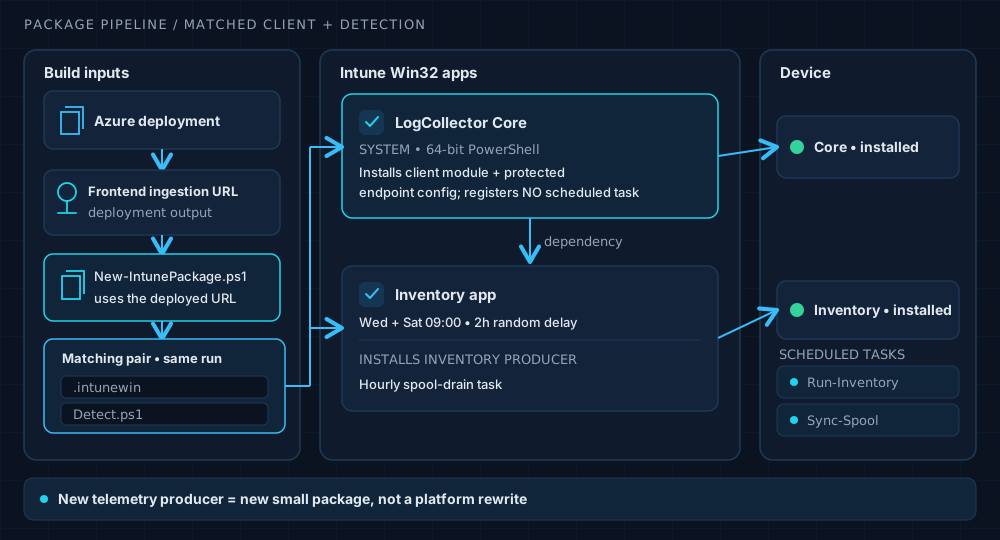
Figure 2. Core is a dependency; producers are small and separate.
Two Win32 apps: Core installs the client module and a protected endpoint configuration and collects nothing; Inventory depends on it and registers the scheduled tasks. Inventory runs on Wednesday and Saturday mornings with a two-hour random delay, so ten thousand laptops do not stampede the endpoint at 09:00 sharp, and a separate hourly task drains the spool.
The packaging script is where configuration drift goes to die. It stamps the deployment's frontend URL into the Core configuration, then generates the detection script from the same configuration object, in the same run:
# Artifacts/MSLabs/1.15.2/2-Intune/New-IntunePackage.ps1 (lines 226-240)
$coreConfigPath = Join-Path $coreStaging 'Config.psd1'
[IO.File]::WriteAllText($coreConfigPath, (ConvertTo-ConfigurationText -Configuration $coreConfig), [Text.UTF8Encoding]::new($false))
$coreDetectionPath = Join-Path $coreStaging 'Detect.ps1'
$coreDetection = [IO.File]::ReadAllText($coreDetectionPath)
$coreDetectionMarker = '__LOGCOLLECTOR_CORE_EXPECTED_CONFIGURATION_BASE64__'
if (-not $coreDetection.Contains($coreDetectionMarker)) {
    throw 'Core detection template is missing its expected-configuration marker.'
}
$coreDetectionPayload = ConvertTo-CoreDetectionPayload -Configuration $coreConfig
$coreDetection = $coreDetection.Replace($coreDetectionMarker, $coreDetectionPayload)
[IO.File]::WriteAllText($coreDetectionPath, $coreDetection, [Text.UTF8Encoding]::new($false))
If the endpoint changes, the detection script changes with it, so Intune sees the device as non-compliant and redeploys. A guard earlier in the same script also refuses to build when the Core package version and the shared module version disagree: they ship together and must be bumped together.
By the numbers
| Component | Version / value |
|---|---|
| Backend release | 1.15.2 |
| Core / client | 1.12.0 |
| Inventory | 1.9.1 |
| Ingestion chunk size | 850 KB or less |
| Worker retries | up to 5, 1 s base delay, 60 s cap |
| Tests | 26 Pester files, 24 C# test files |
The Pester suite runs each test file in its own process, so a stray module import in one test cannot flatter the next.
Takeaways
- Design for the offline device. A bounded spool is not glamorous, but it is the difference between telemetry and wishful thinking.
- Drain the backlog first, and stop at the first transient failure.
- Quarantine what can never succeed. Never let one bad entry block the rest.
- Re-sign at delivery time. Time-bound credentials and stored retries do not mix.
- Generate detection from configuration. Two sources of truth is one too many.
The solution is public, so you can read the real code, the Bicep and the packaging scripts yourself. Bring your skepticism; it improves the pull requests.