Series · LogCollector: authenticated telemetry for Intune devices · Part 1 of 3
Intune · Azure Monitor · Log Analytics · mTLS
LogCollector: device telemetry from Intune, with zero shared secrets
Part 1 of 3. Why we built LogCollector after the HTTP Data Collector API was retired in September 2026, why workspace keys were unsafe on endpoints, and how client certificates, signed bodies and anti-replay let telemetry reach Log Analytics without shared keys.
- Drafted
- Published
- Updated
- Reading time
- 9 min
- Author
- Roberto Gramellini
Source:
LogCollector
· revision 680d7bdf
- Intune telemetry
- Log Analytics
- HTTP Data Collector API retirement
- Logs Ingestion API
- mTLS
- client certificate
- anti-replay
- Data Collection Rule
- Azure Functions
- Service Bus
- Bicep
- PowerShell
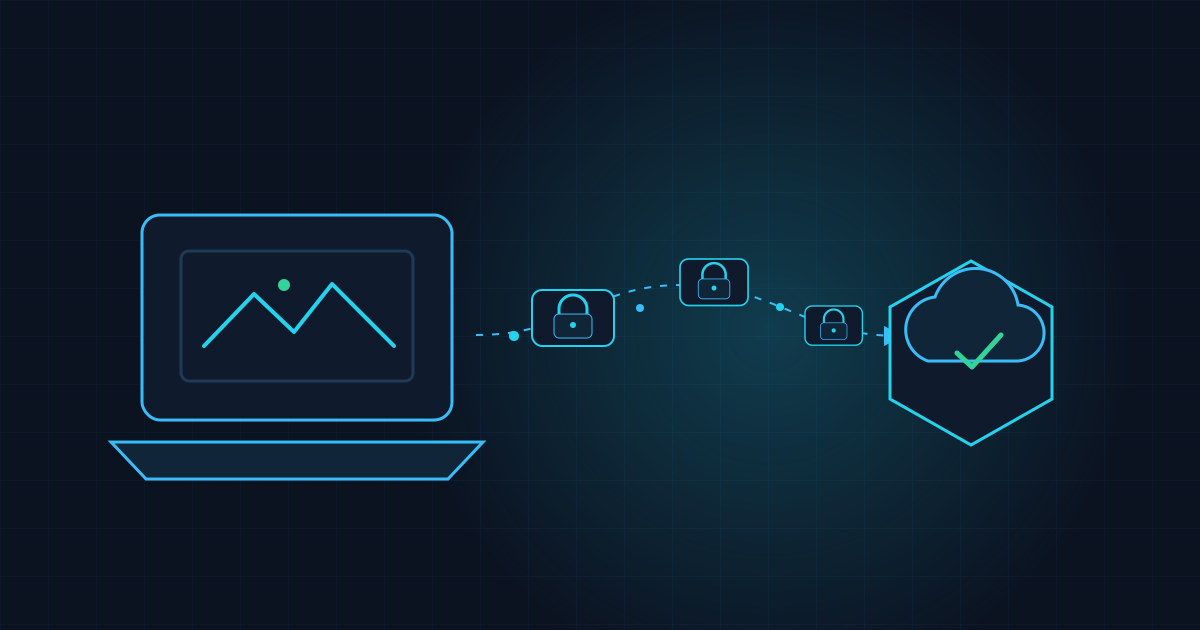
Here is a sentence that should make any security person nervous: "The script just posts the data to Log Analytics using the workspace key." That key is a shared secret, baked into a script, on thousands of endpoints. One leaked copy and anyone can write anything into your workspace.
LogCollector is our answer: a platform that collects telemetry from Windows devices through Intune and lands it in Azure Monitor, where every device proves who it is on every single request. No workspace keys. No function keys. No shared secrets. Just certificates, signatures and a healthy dose of paranoia.
It exists because the HTTP Data Collector API, the old way of pushing custom data into Log Analytics, was retired in September 2026, and its workspace-key model was a liability long before that.
This is part 1 of 3. Part 3 goes deeper into the certificate trust model. It covers the cloud side and the trust model. Part 2 covers the device: the offline spool and the Intune packaging.
Why we built it
For years the standard recipe for getting custom data from endpoints into Log Analytics was the HTTP Data Collector API: a script builds a JSON payload, signs it with the workspace ID and the workspace primary key, and POSTs it to the workspace. It is simple, it works from PowerShell in a dozen lines, and it is how a great many Intune scripts and inventory solutions report data today.
It also has two problems that finally became impossible to ignore:
- The API has been retired. Microsoft deprecated the HTTP Data Collector API, and it stopped working in September 2026. Anything that used it had to move to the Logs Ingestion API (Data Collection Endpoints and Data Collection Rules), which is a different authentication model, a different payload contract and a different way of declaring tables. This was not a find-and-replace.
- The security model was never good. The workspace key is a single shared secret that grants write access to the whole workspace. To use it from endpoints you must distribute it to every device, usually inside a script or an Intune package. Anyone who extracts it from one laptop can inject forged data into your workspace, and rotating it means touching every device at once.
The Logs Ingestion API fixes the second problem on paper (Microsoft Entra authentication and RBAC instead of a shared key), but it creates a new one: an endpoint cannot safely hold an Entra application secret either. Putting a client secret in an Intune script just moves the shared secret to a different place. We needed a design where the device never holds anything that is valuable to anyone else.
So LogCollector is a migration target and a redesign at the same time. Devices authenticate with the certificate they already have (per-device, non-exportable, revocable individually), a thin cloud frontend validates every request, and only a server-side managed identity talks to the Logs Ingestion API. The device keeps the simplicity of "run a script and send data", and the tenant gets per-device identity, replay protection and least-privilege roles.
Why not "just use the workspace key"?
Beyond the retirement date, because telemetry is not only inventory. Today it is hardware data. Tomorrow it is remediation results, health checks and whatever your next Intune script wants to report. We wanted one authenticated, resilient pipe that any producer could use, and the requirements were unforgiving:
- Devices are offline half the time (laptops are, by profession, wanderers).
- Payloads can be large, far beyond a queue message.
- The backend must know which device is talking, and refuse impostors and replays.
- Adding a new kind of telemetry must not mean writing a new service.
The architecture, front to back
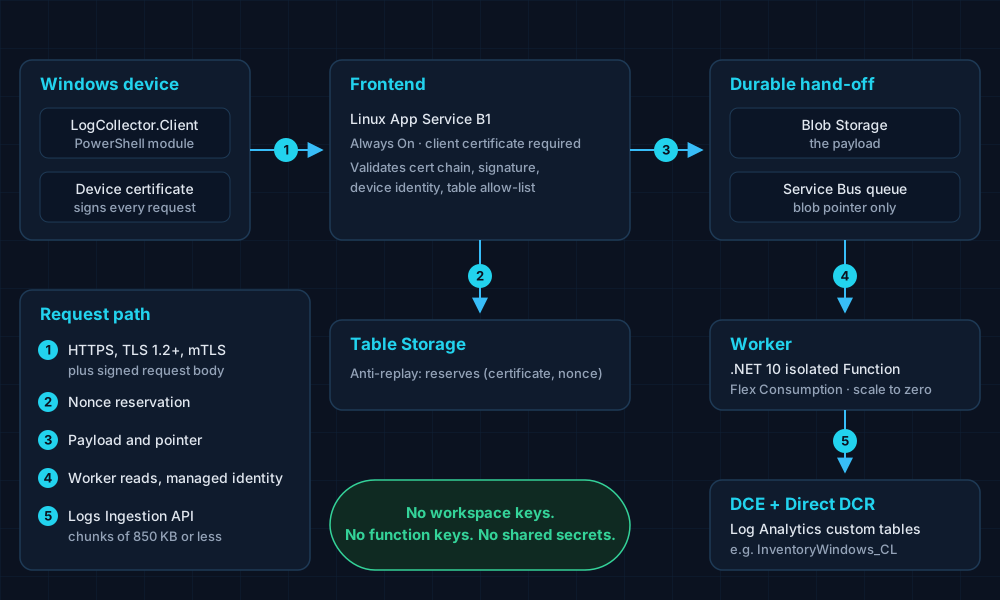
Figure 1. Two compute shapes on purpose: App Service for mTLS at the edge, Flex Consumption for scale-to-zero processing.
On the device, a client module signs and submits telemetry. At the edge, a Linux App Service requires a client certificate over TLS 1.2+. Behind the edge, the payload goes to Blob Storage and only a pointer goes on a Service Bus queue; a .NET 10 isolated Function verifies the SHA-256, adds server-asserted identity columns, chunks the rows and sends them through the Logs Ingestion API using a Data Collection Endpoint and a direct Data Collection Rule.
Between services there are no secrets either: managed identity and RBAC, with storage key authentication switched off.
Six gates before a byte is accepted
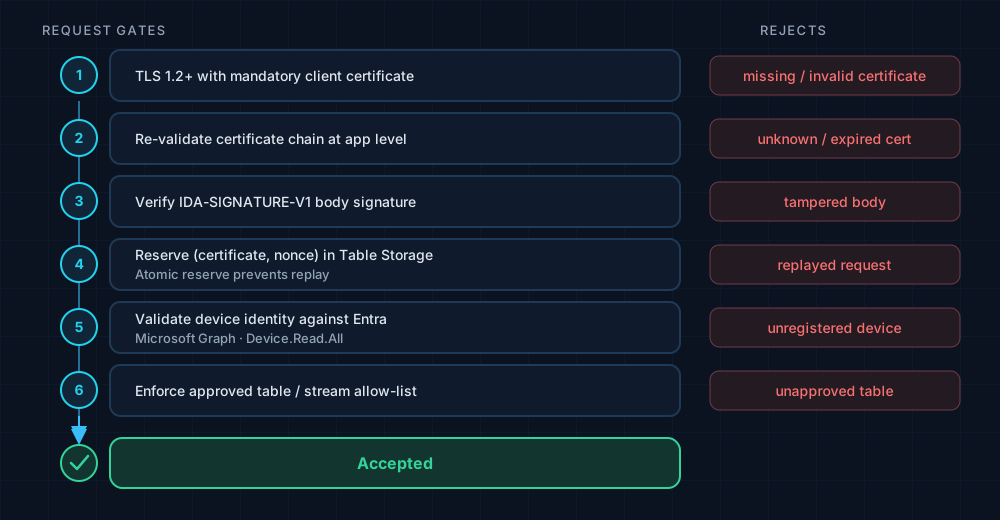
Figure 2. Each gate rejects a different kind of liar.
Signed, every time
The client builds a canonical string from the method, path, timestamp, a fresh nonce and the exact body bytes, and signs it with the device certificate (IDA-SIGNATURE-V1):
# src/Client/RequestSigning.psm1 (lines 95-110)
$timestamp = [DateTimeOffset]::UtcNow
$nonce = [Guid]::NewGuid()
$bodyBytes = $script:Utf8NoBom.GetBytes($Body)

$canonical = Get-SignedRequestCanonicalText `
    -Method $Method `
    -Path $Uri.AbsolutePath `
    -Timestamp $timestamp `
    -Nonce $nonce `
    -BodyBytes $bodyBytes

$canonicalBytes = $script:Utf8NoBom.GetBytes($canonical)

$algorithm = $null
$signature = $null
Certificate first, signature second
On the server, the certificate chain, validity window and EKU are checked before the application-level signature is verified over the received bytes. The ordering matters: you do not want to spend cryptographic effort on a body whose sender cannot even prove who they are.
// src/Shared/Security/TelemetryRequestAuthenticator.cs (lines 81-96)
// 2) Client certificate: chain, validity window, EKU, trust tier.
var certResult = _certValidator.Validate(context.ConnectionCertificate, context.ForwardedCertificateHeader);
if (!certResult.Ok)
    return Deny(401, $"client cert: {certResult.Reason}", certResult.Certificate);

var cert = certResult.Certificate;
if (cert is null)
{
    // Only reachable when RequireClientCert is off; signatures still need a
    // public key, so there is nothing left to verify against.
    return Deny(401, "client certificate is required for signed requests");
}

// 3) Body signature over the exact received bytes.
var signature = _signatureVerifier.Verify(
Replays die in Table Storage
A signature alone does not stop an attacker who records a valid request and sends it again. So every (certificate, nonce) pair is reserved atomically in Table Storage, and a second attempt fails. The raw thumbprint is never stored, only a hash:
// src/Shared/Security/AzureTableReplayNonceStore.cs (lines 39-54)
// boundary. The row key hashes the thumbprint so the raw certificate
// identity is never stored, while remaining certificate-scoped.
var normalizedThumbprint = NormalizeThumbprint(certificateThumbprint);
var rowMaterial = Encoding.UTF8.GetBytes($"{normalizedThumbprint}:{nonce:N}");
var rowKey = Convert.ToHexString(SHA256.HashData(rowMaterial)).ToLowerInvariant();
var partitionKey = $"{requestTimestamp.UtcDateTime:yyyyMMddHH}-{rowKey[0]}";

var entity = new TableEntity(partitionKey, rowKey)
{
    ["RequestTimestamp"] = requestTimestamp,
    ["ExpiresAt"] = expiresAt,
    ["CertificateThumbprintHash"] = Convert.ToHexString(
        SHA256.HashData(Encoding.UTF8.GetBytes(normalizedThumbprint))).ToLowerInvariant(),
};

return await AddEntityAsync(entity, retryAfterMissingTable: true, ct).ConfigureAwait(false);
Authenticated is not the same as authorised
A perfectly valid device still cannot choose an arbitrary destination. It may only target a table that an operator has explicitly mapped to a DCR stream:
// src/Functions/Frontend/Functions/TelemetryIngestFunction.cs (lines 150-160)
// Destination allow-list: a client may only target a table that an
// operator has explicitly mapped to a DCR stream.
if (!_streamMap.IsAllowed(envelope.TableName))
{
    _log.LogWarning("Submission targeted unmapped table {Table}.", envelope.TableName);
    return Problem(StatusCodes.Status400BadRequest,
        $"table '{envelope.TableName}' is not an accepted ingestion target", correlationId);
}

var binding = _authenticator.AuthorizeDeviceBinding(auth.Certificate!, envelope.EntraDeviceId);
if (!binding.Ok)
The line after the allow-list is the device binding: the certificate must belong to the Entra device ID the envelope claims to be.
Behind the edge: verify, chunk, publish
The worker resolves the blob only through its configured container and treats a missing blob as a permanent failure, since retrying something that was already reclaimed never succeeds. Then it checks the digest recorded at intake, using a constant-time comparison:
// src/Functions/Worker/Services/PayloadBlobReader.cs (lines 66-78)
if (string.IsNullOrWhiteSpace(pointer.PayloadSha256))
    return Permanent("payload digest is required");

var actual = Convert.ToBase64String(SHA256.HashData(content));
if (!CryptographicOperations.FixedTimeEquals(
        System.Text.Encoding.ASCII.GetBytes(actual),
        System.Text.Encoding.ASCII.GetBytes(pointer.PayloadSha256)))
{
    _log.LogError(
        "Payload digest mismatch for correlationId={CorrelationId} blob={Blob}",
        pointer.CorrelationId, pointer.BlobName);
    return Permanent("payload digest does not match the value recorded at intake");
}
Rows are chunked to 850 KB or less (the configuration is clamped to that hard limit) and the publisher honours Retry-After from the service. Oversize rows are detected before a single byte is sent, so a rejection is never half-applied.
Permission to publish, and nothing more
The worker's managed identity gets Monitoring Metrics Publisher on the DCR, not on the workspace, so it can only write the streams declared there:
// Artifacts/MSLabs/1.15.2/1-Azure/infra/main.bicep (lines 1038-1047)
// Monitoring Metrics Publisher on the DCR is exactly the permission the Logs
// Ingestion API checks. It is scoped to this DCR, not the workspace, so the
// worker can only write the streams declared above.
resource raWorkerDcr 'Microsoft.Authorization/roleAssignments@2022-04-01' = {
  name: guid(dcr.id, workerIdentity.id, 'metrics-publisher')
  scope: dcr
  properties: {
    roleDefinitionId: roleMonitoringMetricsPublisher
    principalId: workerIdentity.properties.principalId
    principalType: 'ServicePrincipal'
  }
}
Schema as configuration
A new telemetry purpose needs a table and a stream mapping, not new code paths. The tables module simply loops over a definition list:
// .../infra/modules/log-analytics-tables.bicep (lines 6-20)
@description('Name of the Log Analytics workspace (existing or just-created) that will receive the tables.')
param workspaceName string

@description('Table definitions: array of { name, columns }.')
param tableDefinitions array

@description('Retention (days) applied to each table.')
param retentionInDays int

resource workspace 'Microsoft.OperationalInsights/workspaces@2023-09-01' existing = {
  name: workspaceName
}

resource tables 'Microsoft.OperationalInsights/workspaces/tables@2023-09-01' = [for table in tableDefinitions: {
  parent: workspace
  name: table.name
Battle scars
- Flex Consumption cannot do client-certificate ingress, so the frontend and worker are hosted differently on purpose.
- The queue message limit forced blob-plus-pointer. Large payloads do not fit in a 256 KB message, and optimism does not change that.
- mTLS versus deployment. Mandatory client certificates also affect Kudu/SCM, so the deployment script temporarily adjusts access restrictions while keeping a fail-closed posture. Locking your own front door with the keys inside is a rite of passage.
- Names are global. Storage and Function names must be unique worldwide, so the customer prefix is chosen once, carefully.
- Device validation needs Graph permission (
Device.Read.All). You can turn it off, and the documentation states clearly that tenant-membership validation is then weaker.
Takeaways
- Prove identity per request. Certificates plus signed bodies beat any shared key, and replay protection closes the gap signatures leave.
- Order your gates cheapest-and-most-decisive first.
- Keep payloads out of queues. Pointers are cheap; surprises are not.
- Scope roles to the smallest resource that does the job: the DCR, not the workspace.
Now to the hard part: laptops that go offline. Continue with Part 2.