Series · LogCollector: authenticated telemetry for Intune devices · Part 3 of 3
Intune · Microsoft Entra ID · mTLS · PKI · Azure Monitor
LogCollector authentication: two certificates, one Entra device ID
Part 3 of 3. How LogCollector accepts both enterprise PKI certificates and the Intune MDM device certificate, verifies each against its own chain of trust, and binds them to the Microsoft Entra device ID carried in OID 1.2.840.113556.5.25.
- Drafted
- Published
- Reading time
- 10 min
- Author
- Roberto Gramellini
Source:
LogCollector
· revision 9768c522
- certificate-based authentication
- CBA
- Intune MDM device certificate
- Entra device ID
- OID 1.2.840.113556.5.25
- X509Chain
- chain of trust
- enterprise PKI
- mTLS
- Logs Ingestion API
- device binding
"Which certificate should the device use?" sounds like a boring configuration question. It is actually the question that decides whether your telemetry pipeline works on 100% of your fleet or on the 60% that happened to get the right template.
This is part 3 of the LogCollector series. Part 1 explained why we replaced the retired HTTP Data Collector API (September 2026) and its shared workspace key with per-request device identity. Part 2 covered the offline spool. This part zooms into one thing only: how the frontend decides that a certificate is trustworthy and which device it belongs to.
The problem: not every device has "the" certificate
The cleanest design is a client certificate issued by your own enterprise PKI (an NDES/SCEP or PKCS profile deployed through Intune, for example). It chains to your root, you control the template, and you can even embed the device ID in it. That is certificate-based authentication (CBA) in the classic sense.
In real tenants, though, you will find:
- devices that have not received the PKI profile yet (new enrolments, autopilot in progress);
- devices where the profile failed and nobody noticed;
- tenants with no internal PKI at all.
Yet every Intune-enrolled Windows device already has a certificate: the Intune MDM device certificate it uses to talk to the management service. It is unique per device, protected by the device and issued by an Intune CA. It is free, it is already there, and it is almost too convenient not to use.
So we support both, as two explicit trust tiers, and we bind both to the same thing: the Microsoft Entra device ID.
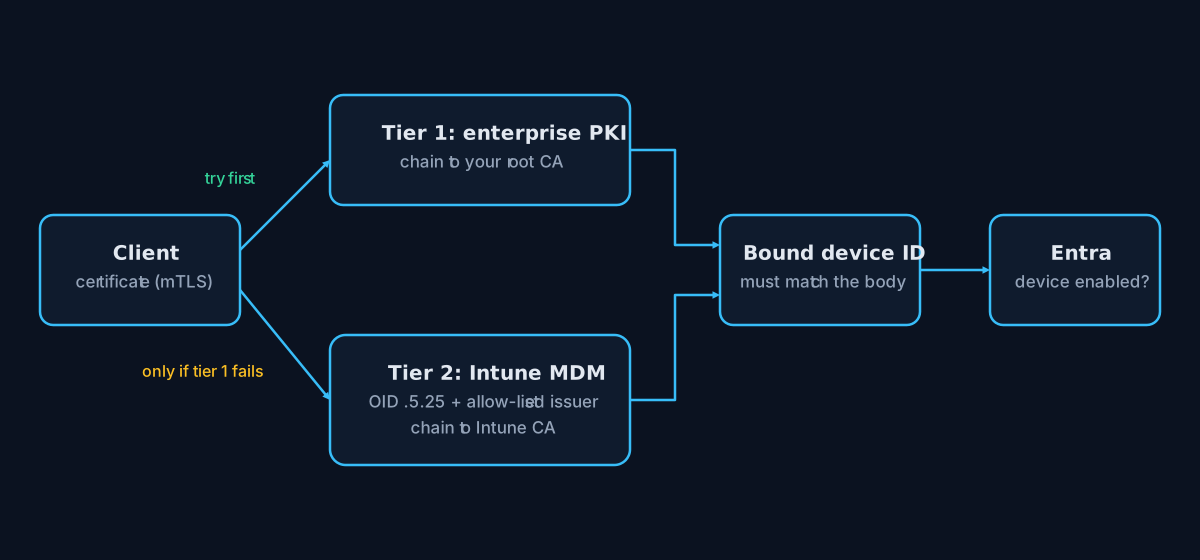
Figure 1. Tier 1 is tried first. Tier 2 only applies when all of its conditions hold.
Why the OID ending in 25 is the key
The Intune MDM certificate carries the Entra device ID in a custom extension with OID 1.2.840.113556.5.25. It is the only place where the certificate states, in a machine-readable way, which Entra device it belongs to.
You might be tempted to read the Subject CN instead. Do not. The CN of an Intune certificate is also a GUID, but it is a different GUID that is not the Entra device ID. We found out the polite way: by reading the code comment we had left for ourselves after being briefly confused. The validator documents it explicitly:
// src/Shared/Security/ClientCertValidator.cs (lines 288-296)
// Auto: the operator map wins (explicit intent). For an explicitly
// trusted Intune enrollment certificate the .5.25 OID is authoritative
// and must precede the Subject CN, because Intune puts a *different*
// GUID in the CN that is not the Entra device id.
DeviceIdBinding.Auto => LookupByThumbprint(cert)
    ?? (CanUseIntuneEnrollmentFallback(cert) ? ExtractIntuneEnrollmentDeviceId(cert) : null)
    ?? FirstSanValue(cert, X509NameType.UrlName)
    ?? FirstSanValue(cert, X509NameType.DnsName)
    ?? ExtractFromSubject(cert),
The Auto mode is what makes the two tiers coexist: for a PKI certificate the ID comes from a SAN or the CN (whatever your template emits), while for a trusted Intune certificate it comes from the .25 OID. The rest of the pipeline neither knows nor cares which one it was.
Extracting the Entra device ID from the certificate
The extension value is an ASN.1 OCTET STRING that holds the 16 raw bytes of the GUID. Here is the extraction, and note how little it trusts its input:
// src/Shared/Security/ClientCertValidator.cs (lines 519-538)
internal static string? ExtractIntuneEnrollmentDeviceId(X509Certificate2 cert)
{
    var extensions = cert.Extensions
        .Where(e => e.Oid?.Value == IntuneEnrollmentDeviceIdOid)
        .ToList();

    // Exactly one: duplicated extensions are ambiguous, so fail closed.
    if (extensions.Count != 1) return null;

    try
    {
        var reader = new AsnReader(extensions[0].RawData, AsnEncodingRules.DER);
        var bytes = reader.ReadOctetString();
        reader.ThrowIfNotEmpty();
        return bytes.Length == 16 ? new Guid(bytes).ToString() : null;
    }
    catch (AsnContentException)
    {
        return null;
    }
}
Four small decisions are worth a second look:
- Exactly one extension. Zero means "not an Intune certificate"; two means someone is playing games. Both return
null. - Strict DER parsing with
AsnReader, thenThrowIfNotEmpty(). Trailing garbage is rejected. - Exactly 16 bytes. Anything else is not a GUID.
- Any malformed content returns
null, never an exception that leaks a half-parsed value.
For the non-Intune sources the same discipline applies: the CN or SAN must equal a GUID. Scanning a DN for something GUID-shaped would let a permissive template bind an attacker to a victim's device ID.
An important subtlety: an OID in a certificate is just data. Anybody can mint a certificate with that extension. The ID is meaningful only if the certificate comes from a CA we trust, which brings us to the chain.
Verifying the certificate with the chain of trust
Each tier builds its own X509Chain against its own explicit set of anchors. We do not use the machine's trust store, because "whatever the OS trusts" is much too broad for a telemetry endpoint.
Tier 1, enterprise PKI:
// src/Shared/Security/ClientCertValidator.cs (lines 302-318)
private (bool Ok, string? Reason) ValidateEnterpriseTrust(X509Certificate2 cert, DateTime now)
{
    if (_trustedCaThumbprints.Count == 0 && _trustedCaSubjects.Count == 0 && _rootStore.Count == 0)
        return (false, "enterprise PKI trust anchor not configured");

    using var chain = CreateChain(now);
    if (_rootStore.Count > 0)
    {
        chain.ChainPolicy.TrustMode = X509ChainTrustMode.CustomRootTrust;
        chain.ChainPolicy.CustomTrustStore.AddRange(_rootStore.ToArray());
        chain.ChainPolicy.ExtraStore.AddRange(_rootStore.ToArray());
    }
    if (_intermediateStore.Count > 0)
        chain.ChainPolicy.ExtraStore.AddRange(_intermediateStore.ToArray());

    if (!chain.Build(cert))
        return (false, FormatChainFailure(chain));
X509ChainTrustMode.CustomRootTrust is the important line: only the root certificates we configured are anchors. After a successful build, optional policies pin the chain further by CA thumbprint, CA subject, or distinct Root and SubCA constraints (the CA role must have Basic Constraints: CA=true).
Tier 2, Intune MDM:
// src/Shared/Security/ClientCertValidator.cs (lines 405-418)
private (bool Ok, string? Reason) ValidateIntuneTrust(X509Certificate2 cert, DateTime now)
{
    using var chain = CreateChain(now);
    // Some Intune CA chains publish no CRL/OCSP endpoints. Never apply this exception to enterprise PKI.
    if (_skipIntuneRevocationCheck)
        chain.ChainPolicy.RevocationMode = X509RevocationMode.NoCheck;
    chain.ChainPolicy.TrustMode = X509ChainTrustMode.CustomRootTrust;
    chain.ChainPolicy.CustomTrustStore.AddRange(_intuneRootStore.ToArray());
    chain.ChainPolicy.ExtraStore.AddRange(_intuneRootStore.ToArray());
    if (_intuneIntermediateStore.Count > 0)
        chain.ChainPolicy.ExtraStore.AddRange(_intuneIntermediateStore.ToArray());

    return chain.Build(cert) ? (true, null) : (false, FormatChainFailure(chain));
}
Same mechanism, different anchors, and one honest exception: some Intune CA chains publish no CRL/OCSP endpoints, so revocation can be switched off for this tier only, with a loud warning at startup. The comment says it all: never for enterprise PKI.
Who decides which tier applies?
Not the client. The server walks the tiers in a fixed order and tier 2 has to earn its place:
// src/Shared/Security/ClientCertValidator.cs (lines 249-262)
var enterprise = ValidateEnterpriseTrust(cert, utcNow);
if (enterprise.Ok)
    return new CertificateValidationResult(true, cert, TrustTier.EnterprisePki, null);

if (CanUseIntuneEnrollmentFallback(cert))
{
    var intune = ValidateIntuneTrust(cert, utcNow);
    if (intune.Ok)
    {
        _log.LogInformation(
            "Accepted Intune enrollment certificate (issuer={Issuer}, thumb={Thumb}).",
            cert.Issuer, cert.Thumbprint);
        return new CertificateValidationResult(true, cert, TrustTier.IntuneEnrollment, null);
    }
The gate for the fallback is deliberately narrow:
// src/Shared/Security/ClientCertValidator.cs (lines 420-441)
private bool CanUseIntuneEnrollmentFallback(X509Certificate2 cert)
{
    if (!_allowIntuneEnrollmentCertificateFallback
        || _intuneRootStore.Count == 0
        || (_deviceBinding != DeviceIdBinding.Auto && _deviceBinding != DeviceIdBinding.IntuneEnrollmentOid))
    {
        return false;
    }

    if (ExtractIntuneEnrollmentDeviceId(cert) is null)
        return false;

    if (!_intuneEnrollmentIssuerSubjects.Contains(cert.Issuer))
    {
        _log.LogWarning(
            "Certificate carries the Intune enrollment OID but issuer '{Issuer}' is not allow-listed.",
            cert.Issuer);
        return false;
    }

    return true;
}
In plain words, the Intune tier is consulted only when:
- the operator enabled it (and it can be switched off with one setting);
- Intune root anchors are configured;
- the binding mode is
AutoorIntuneEnrollmentOid; - the certificate has the
.25extension; - the issuer is on an allow-list (by default the Intune MDM Device CA names).
Only then is the chain built against the Intune anchors. A certificate that has the OID but a stranger for an issuer is logged and refused. If tier 1 already accepted the certificate, tier 2 is never involved.
From "valid certificate" to "this device may speak"
A valid chain says the certificate is genuine. It does not say that this certificate is allowed to submit data for the device named in the request body. That is a separate check in the authenticator:
// src/Shared/Security/TelemetryRequestAuthenticator.cs (lines 135-147)
var boundDeviceId = _certValidator.GetBoundDeviceId(certificate);
if (string.IsNullOrEmpty(boundDeviceId))
{
    return _certValidator.RequireDeviceBinding
        ? (false, 401, "client certificate is missing the configured device-id binding claim", null)
        : (true, 202, null, null);
}

if (!Guid.TryParse(claimedEntraDeviceId, out var claimed)
    || !string.Equals(boundDeviceId, claimed.ToString(), StringComparison.OrdinalIgnoreCase))
{
    return (false, 403, "client certificate is not bound to the submitted device", boundDeviceId);
}
This is what stops an authenticated device from writing rows for another device. The identity is taken from a CA-asserted value in a verified chain, never from something the client typed into JSON.
The last gate asks Entra. GraphDeviceAuthorizer calls Microsoft Graph with the frontend's managed identity and accepts the device only if it exists and accountEnabled is true:
// src/Shared/Security/GraphDeviceAuthorizer.cs (lines 103-110)
using var request = new HttpRequestMessage(HttpMethod.Get,
    $"https://graph.microsoft.com/v1.0/devices(deviceId='{deviceId:D}')?$select=deviceId,accountEnabled");
...
if (response.StatusCode == HttpStatusCode.NotFound) return false;
// Outages and missing application consent are not an authorization success.
// Propagate these failures so intake fails and the client retains its spool.
response.EnsureSuccessStatusCode();
So disabling or deleting a device in Entra stops its telemetry, even though its certificate is still cryptographically perfect. Positive answers are cached for a while and failures never count as "yes": a Graph outage simply makes the device keep its spool and retry (that spool is the subject of part 2).
The detail that keeps the Intune tier honest
Since the OID is "just data", it is worth restating why the design is safe:
- The chain proves the certificate was issued by a CA you chose.
- The issuer allow-list limits tier 2 to the Intune device CAs.
- The binding compares that CA-asserted device ID with the body.
- The signature proves possession of the private key.
- Graph proves the device is still a live, enabled device in your tenant.
Remove any one of them and a different attack opens. Keep all of them and the OID is simply a convenient place where a trusted CA wrote the device ID for us.
Choosing and operating the tiers
| Situation | What to do |
|---|---|
| You have an enterprise PKI and control the template | Configure the root (and optionally Root/SubCA constraints). Put the device ID in a SAN or CN. |
| You have no PKI, or enrolment is still in progress | Leave the Intune fallback enabled and configure the Intune anchors. |
| You want PKI only | Set ClientCert__AllowIntuneEnrollmentCertificateFallback to false. |
| You have a legacy template without the device ID | Use the operator-maintained thumbprint-to-device map as an escape hatch. |
A few operational notes from the repository documentation: the Pki* constraints are constraints, not trust anchors (the root must still be configured and still chain), they do not apply to the Intune tier, and malformed policy values fail closed instead of being silently ignored.
Takeaways
- Offer two trust tiers, but make the second one earn its place. Convenience should never widen trust by default.
- Use explicit anchors (
CustomRootTrust), not whatever the OS trusts. - Take identity from a CA-asserted value and parse it strictly, exactly one extension, DER, 16 bytes.
- Bind the certificate to the device in the request, then ask Entra whether that device is still allowed to exist.
- Fail closed. Misconfiguration, malformed values and Graph outages never turn into an accepted request.
The whole logic lives in robgrame/LogCollector: start from src/Shared/Security/ClientCertValidator.cs, then read the tests next to it, which cover the tiers, the OID parsing and the PKI role constraints. Bring a lab tenant, a root CA and a healthy suspicion of GUIDs.